Developer blog
The Godot Course I Wanted Was in Spanish: Why I Built This Instead of Buying Dubbing
The best Godot course I could find was in Spanish. I don't speak Spanish.
Subtitles are the obvious answer and they do not work here. For a talking head they are fine, your eyes are free. In a screencast your eyes are the whole point: the instructor says "now drag this onto the node" while his cursor is already doing it, and you cannot read the bottom of the frame and watch his hands at the same time. I rewound a lot. I quit around lesson four.
So I went to price dubbing it instead. The course runs about six hours.
Six hours of dubbing costs between $49 and $540, depending on who you ask
Figures below come from Rask's and HeyGen's own pricing pages on 12 August 2026. I checked the pages rather than the articles about them, because two of the "2026 pricing" posts I found first were already wrong: one had HeyGen's Creator allowance at a third of what the site says.
Rask sells minutes. Creator is $60/mo for 25 minutes, Creator Pro $150/mo for 100 minutes, Business $750/mo for 500. Six hours is 360 minutes, so on Creator Pro that is four months of subscription, about $540, to watch one course once.
HeyGen sells credits. Creator is $29/mo for 600 credits, Pro $49/mo for 1,000, and audio dubbing without lip sync costs 2 credits a minute. Those 360 minutes are 720 credits, so about $49 on the right plan. That is a fair price and I would rather say so than pretend the whole market is a rip-off.
What stopped me was not the top of the range. It was that every free tier is a demo: three minutes on Rask, three watermarked videos on HeyGen. There was no version of "I am one person, I want to watch one course, on my own laptop, and I would rather not pay a subscription for that."
My laptop can run text-to-speech. Paying rent to hear a course in my own language felt like the wrong shape of problem.
What the chain actually looks like
The thing is six boxes, not one model:
  video ──► extract audio ──► transcribe (Whisper, word timings)
                                    │
                                    ├──► who is speaking?  (server mode only)
                                    ▼
                              translate lines
                                    ▼
                              speak each line  (Piper on your device,
                                    │           or 10 voices on servers)
                                    ▼
                    fit the speech back into the original timing
                                    ▼
                          dubbed audio + subtitles
Each box treats the previous box's output as fact, which is where quality goes to die.
I assumed boxes two and four were the hard ones. They are not. Whisper hands back six hours of Spanish more accurately than I would type it, and machine translation of technical narration is fine once the terms are fixed.
The last box is where the project actually lives, and it is the one I underestimated completely.
My language runs longer than Spanish, and the hole in the timeline does not
A line that takes four seconds in Spanish wants five and a half in mine. It still has to land in a four-second hole, because at second eight the instructor clicks something and starts talking about what he just clicked.
Three levers, in this order.
Speed the speech up. There is a ceiling around 1.3x. Past that it stops sounding like someone talking quickly and starts sounding like a hostage statement. It also has to be a real time stretch, which cost me an embarrassing afternoon: AudioBufferSourceNode.playbackRate resamples, which raises pitch, so my narrator became a chipmunk. FFmpeg's atempo filter stretches without touching pitch, which is why an entire ffmpeg build now runs inside the browser tab.
Slow the video down, slightly, and only across the region that overflows. Below about 0.8x the picture reads as broken, and I tried lower before I believed it.
Let it spill. If a line still does not fit, it runs past its window into the gap after it. Audio is never truncated, because a cut sentence is worse than a late one, and tutorials are full of gaps where the instructor is typing.
That cascade is most of the engineering. The AI part is a few calls around it.
The terminology problem no model will solve for you
A translation engine has no memory of what it decided ten seconds ago. Run a Godot course through one and Node, scene, signal and viewport come back as three or four different words across the lessons, while AnimationPlayer gets helpfully translated when it is a class name that has to survive untouched.
That is not a knowledge problem, so a better model does not fix it. You fix it by deciding the words once and applying them everywhere, and by reading the transcript and the translation side by side before a single line is spoken. It is why the review screen sits in front of generation instead of a progress bar: I wanted the boring pass to be unavoidable, including for me.
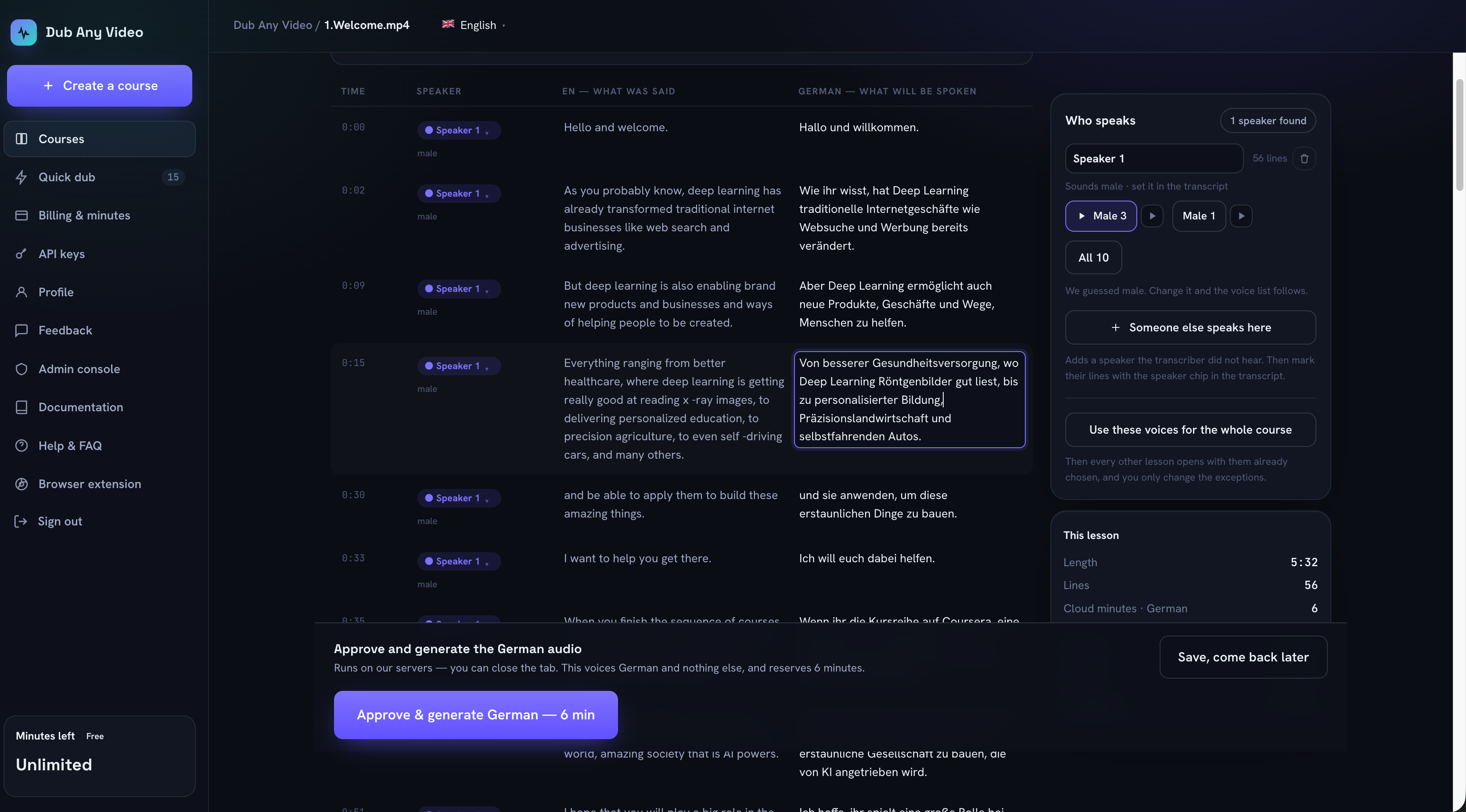 A wrong word here costs one keystroke. The same word after generation costs a re-render. (Click for the full screen.)
The free mode: unlimited, because your own machine does the work
This is the mode I built for myself, and there is no meter on it. Not "unlimited within a fair use policy", not a trial that expires. There is nothing to meter, because your machine synthesizes the speech, so there is no per-minute cost for me to pass on. No card is asked for.
The video goes into your browser's own storage and stays there. Speech synthesis is Piper compiled to WebAssembly, running on your device, using WebGPU where the browser exposes it. A voice model is downloaded once from its public repository and reused by every later lesson, which is why the first lesson in a new language is slow and the tenth is not.
Two things do leave, and I would rather spell them out than write "100% private" and hope nobody opens the Network tab. If you ask for a transcript, the audio goes from your browser straight to a speech-to-text provider on your own API key, never through us. If you translate with the free option, the text of your lines goes to a public translation endpoint. Import an SRT and a translation you already have, and neither happens: nothing leaves at all.
The browser speaks 39 languages against 31 on the servers, because the on-device catalogue and the server one are genuinely different sets. Catalan, Welsh, Persian and Georgian exist only in the browser.
Rendering resumes per line. Every synthesized line is written to storage the moment it exists, together with a hash of the text it came from, so closing the tab loses nothing and editing one line later re-renders that line instead of the lesson. That one exists because I lost a forty-minute render to a stray Cmd-W.
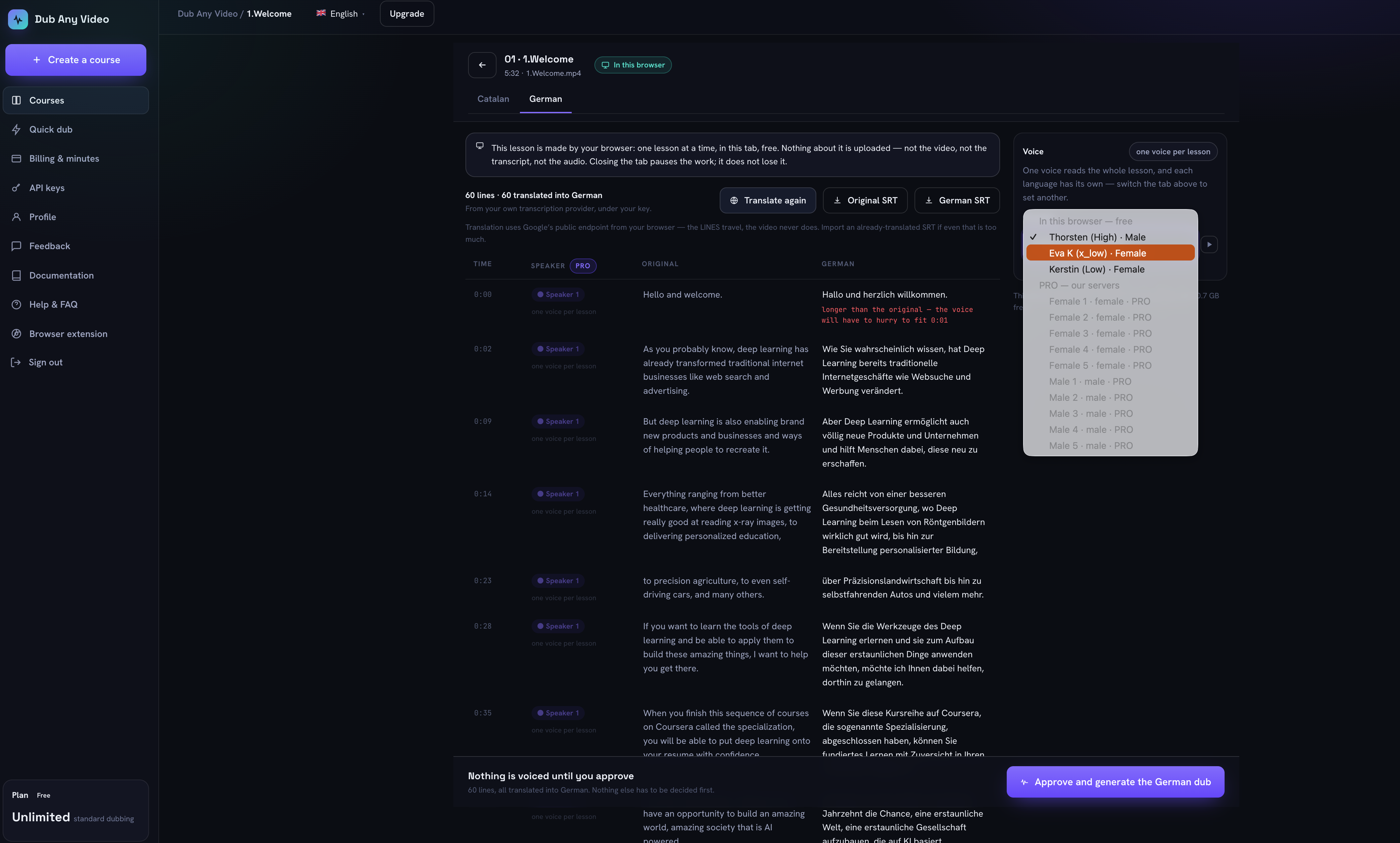 The free mode being honest on screen: on-device voices offered, premium ones listed as unavailable rather than hidden, and the one-voice limit stated instead of buried. (Click for the full screen.)
Out the other end you get a WAV track and an SRT per language, or the whole course as one archive.
The limits are real ones. The tab has to stay open, it does one lesson at a time, and the whole lesson is read by a single voice, because working out who is speaking runs server-side. There is no course glossary here either. A long lesson warms the laptop up, and a phone is the wrong machine for this.
The paid mode: for when one lesson is not the job
Everything above assumes you are me, watching one course. A team localizing a catalogue has a different problem, and that is what the server side is for.
It separates speakers, giving each person their own voice out of ten. That matters the moment a course has an interviewer and a guest: one voice for two people is noticed immediately, even by someone who cannot say what is wrong.
Jobs outlive the tab, so forty lessons in six languages is something you start and then close the laptop on. Every lesson and language pair carries its own state on one screen: ready, generating, stale after an edit, failed.
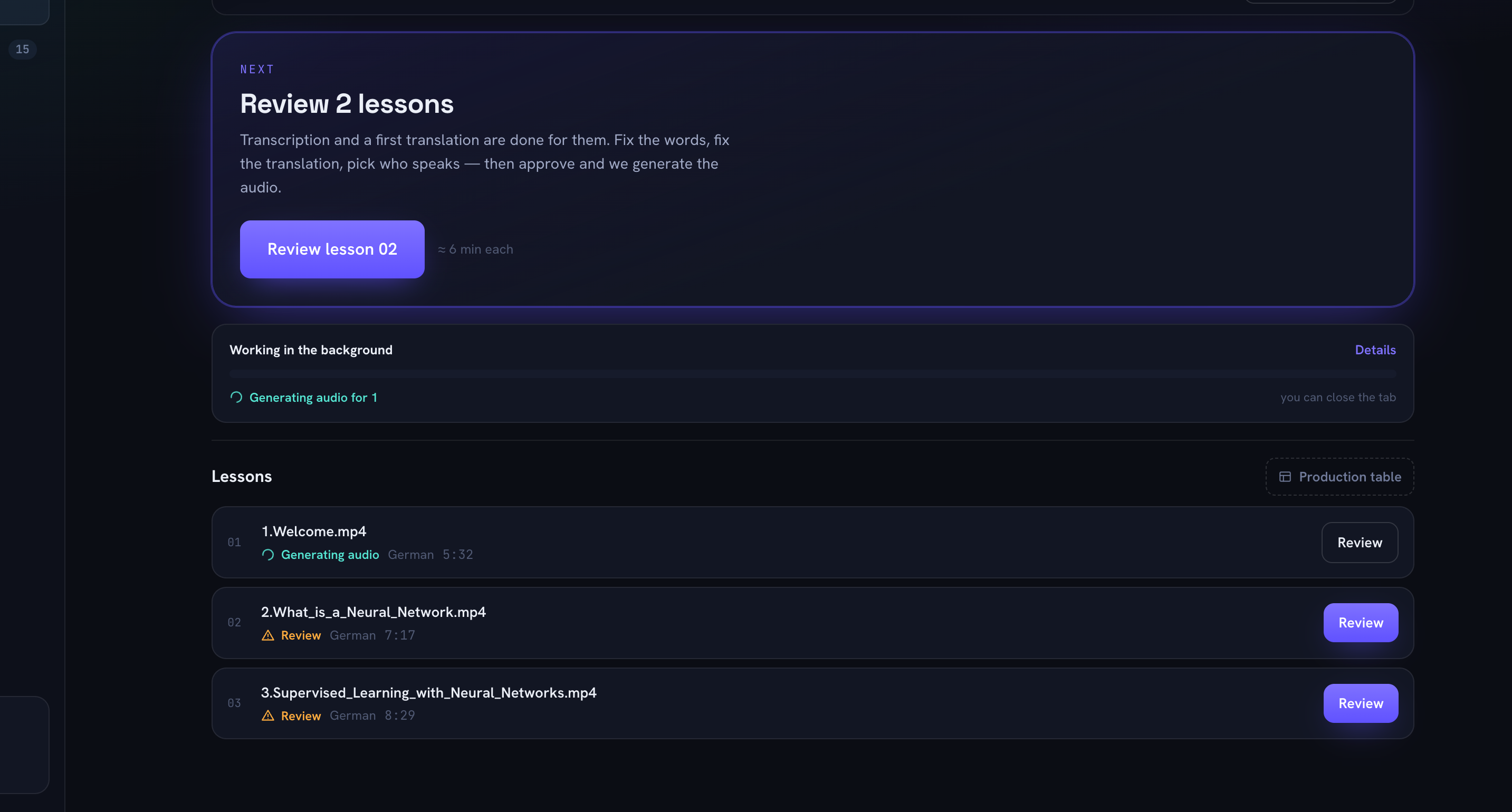 One lesson is being voiced on the servers, two are waiting for a human, and the line under the bar says you can close the tab. That last part is the actual difference between the two modes. (Click for the full screen.)
The glossary lives here too: decide once, at course level, that AnimationPlayer stays AnimationPlayer, and every lesson in every language obeys. Same for per-language voice defaults.
The servers speak 31 languages, 26 shared with the browser list; Croatian, Japanese, Korean, Estonian and Lithuanian exist only on this side. One job is capped at an hour of media, results are files with a stated expiry rather than a vague promise, and there is an API if you would rather drive it from code.
Pricing is a ladder: EUR 7.99 a month for 12 hours of processing, EUR 14.99 for 25, EUR 29.99 for 55. The first tier is about EUR 0.67 per hour of source video.
That is roughly a hundredth of the per-minute rates at the top of this post, and it is not because I am clever. It is because I skipped lip sync and voice cloning. Those are most of what you pay for elsewhere, they are genuinely expensive to run, and for watching a course neither one matters to me: I do not care whether the instructor's mouth matches, I care whether I understand him while I watch his hands.
What I did not build, on purpose
Lips do not match, and will not in this design. On-screen text stays in the original language, so a Spanish editor UI stays Spanish. Voices come from a fixed set rather than the original speaker's. Neither mode translates live while you watch.
If you need a marketing video where the presenter's mouth moves correctly in nine languages, buy one of the tools priced at the top. They do that well, and this does not do it at all.
I watched the Godot course in my own language in the end. Getting the class names right took about twenty minutes of reading per lesson, which is roughly the time I used to spend rewinding. The browser mode is here if you have a course sitting in a language you do not speak; it does not ask for a card, and you can watch the Network tab while it runs.