Developer blog
AI Video Translators for eLearning: A Course-Ready Buyer's Checklist
A demo clip tells you how good one minute of synthetic speech sounds. It tells you nothing about lesson 27, where the product name has been translated three different ways, the narrator changed voice somewhere around module 4, and nobody remembers which lessons were read by a human before they were voiced.
Three signs a tool was built for courses rather than clips: lessons and languages live in one place with a visible state for each pair, you get to correct the machine before anything is spoken, and decisions you make in lesson 3 still apply in lesson 27. Everything below is a way to test those claims against a product you are considering, ours included.
Why a course is not a folder of videos
A single video is a transaction. You submit it, you get a file back, you move on. A course carries state, and state is the part that breaks.
Courses get edited after they ship. A price changes, a compliance line is reworded, and the localized audio quietly stops matching the source with nothing to tell you which files went wrong. Courses also carry vocabulary: product names, internal jargon and units repeat across every lesson, and an engine that sees each lesson in isolation has no reason to render them the same way twice. Then there are the people in them. Learners notice when the instructor sounds like someone else halfway through.
A 30-second evaluation cannot show you any of this. Month two shows you all of it.
The 10-point checklist
The table is the summary. The sections under it are the test procedure, and every one of them can be run as a hands-on trial with any vendor.
| # | Criterion | The question to ask | Fail signal |
|---|---|---|---|
| 1 | Course structure | Are lessons and languages first-class objects, or separate jobs? | Every lesson is an unrelated job with its own settings |
| 2 | Editable source text | Can I correct the transcript before translation? | Transcript is display-only or hidden entirely |
| 3 | Editable translation | Can I edit the translated line and keep the edit? | Editing forces a full re-translation and loses the rest |
| 4 | Terminology | Can I fix a term once and apply it across lessons? | A glossary that only affects future work |
| 5 | Speakers | Can I correct who is speaking and merge misdetected speakers? | Speaker split is fixed and unexplained |
| 6 | Voice defaults and overrides | Can I set voices in bulk and override one lesson? | One voice per job, re-picked every time |
| 7 | Approval gate | Does anything get voiced before I say so? | Audio is generated automatically on upload |
| 8 | Stale handling | When I edit an approved lesson, am I told which outputs no longer match? | Old file keeps being served as current |
| 9 | Retry and recovery | Can I retry one failed lesson or one language, and cancel work not yet started? | All-or-nothing reruns, no cancel, unclear billing |
| 10 | Exports | Can I pull audio and subtitles per language, per lesson, in bulk? | One combined download, no per-language structure |
1. Course structure
Ask the vendor to put fifteen lessons in three languages on one screen. What you want is a grid: lessons down one axis, languages across the other, a state in every cell. Anything less is a spreadsheet of download links with a login. Ask for the hard limits as numbers too, since a tool capped at three target languages will not survive your second market.
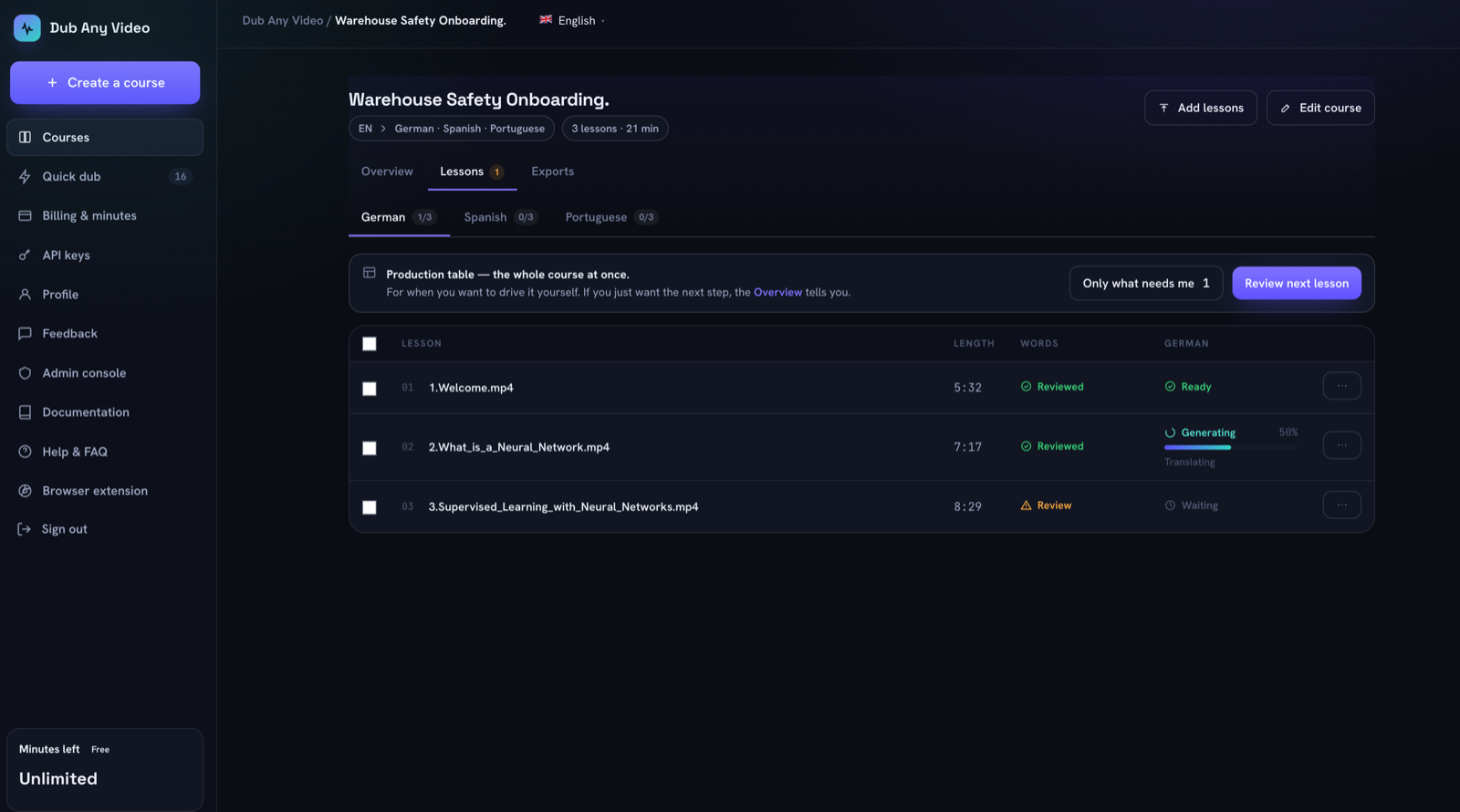 Three lessons in one language column: one ready, one at 50 per cent, one still waiting. The three pairs move independently, which is the whole point of the grid.
2. Editable source text
Speech recognition mishears brand names, acronyms and figures, and each of those errors gets copied into every language you generate. If you cannot open and correct the source transcript, you are buying a translation of a document you were never allowed to read. Test it with a lesson containing a product name and a spoken figure like "fourteen point five percent".
3. Editable translation
Machine translation gives you a first draft. The test is not whether the translated box accepts typing, it is whether your typing survives. Edit one line, trigger whatever the tool calls regeneration, then check that your edit is still there and the lines you did not touch have not been reshuffled.
4. Terminology
A glossary earns its place only if it changes text that already exists. Add a term after two lessons have been translated, then reopen lesson 1. If lesson 1 still says the old thing, what you have is a hint to the engine rather than a control. Ask how the replacement is scoped, too: whole-word and case-aware matching is what stops the term "IT" from rewriting every occurrence of the word "it".
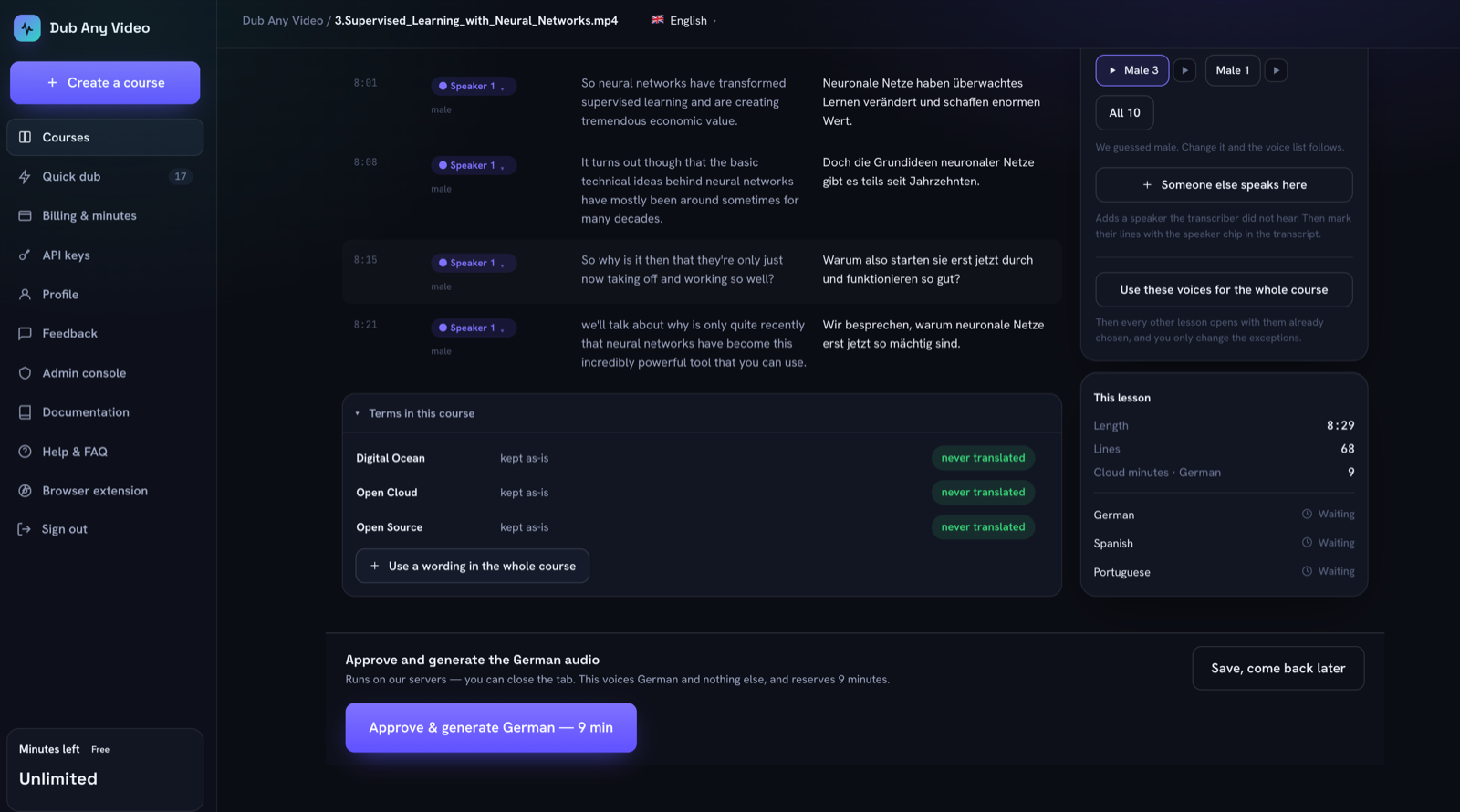 Three product names decided once. The glossary sits inside the lesson you are reviewing, because that is where you notice a word going wrong.
5. Speakers
Diarization guesses. It splits one speaker in two when the room changes and merges two people who sound alike. What matters for buying is whether the product admits the guess and lets you fix it: merge two detected speakers, move an individual line to the right person, correct a gender the classifier got wrong, all without re-running the lesson.
6. Voice defaults and overrides
Fourteen lessons with two speakers each means about thirty voice decisions, and roughly twenty-eight have the same answer. Ask for bulk assignment: one voice for every speaker of a given gender across the course, with an override for the guest instructor in module 6. Then the harder question. If I change a voice after a lesson has been generated, what happens to the file that already exists?
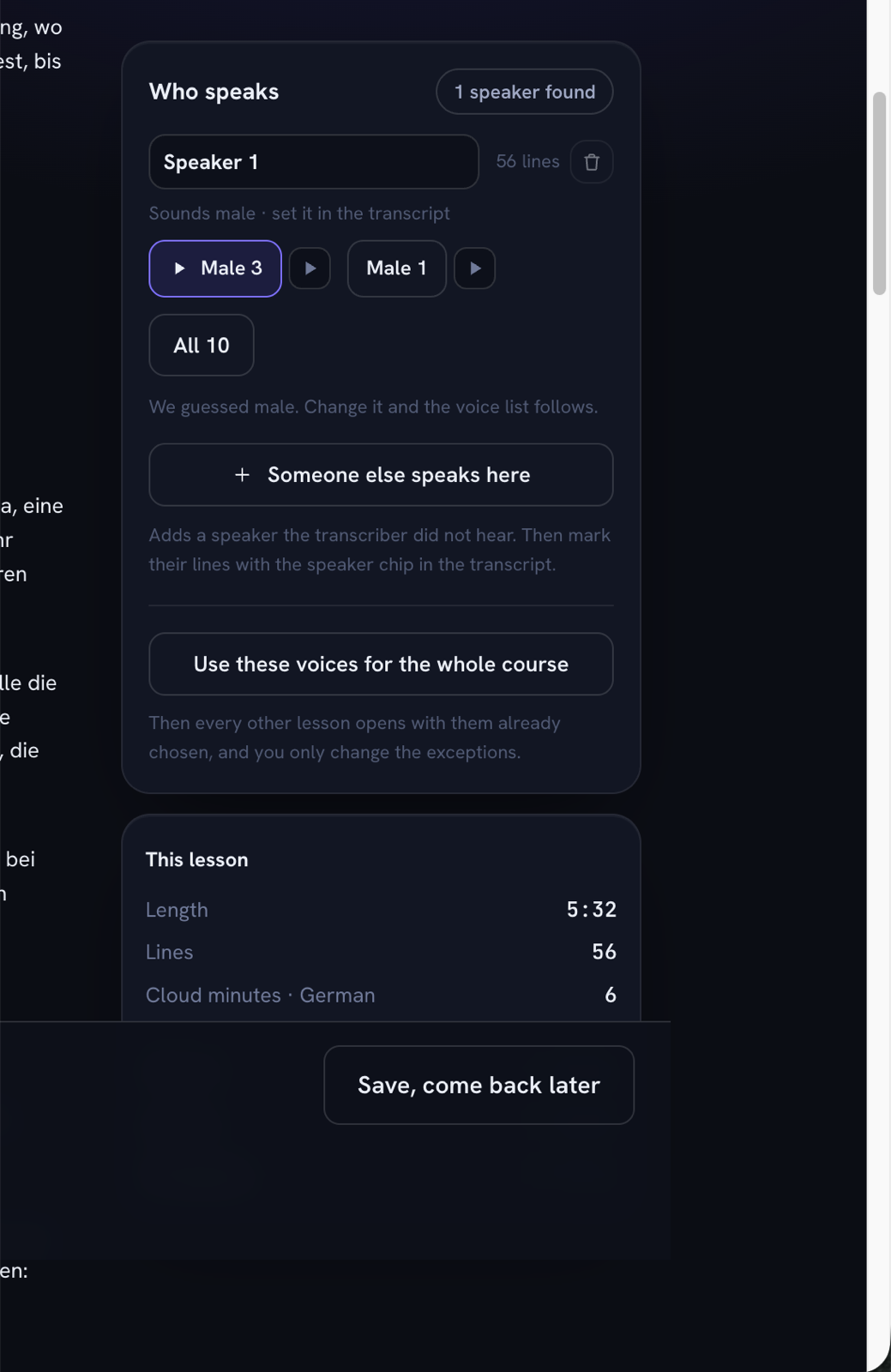 The panel says it guessed, offers the voices for that gender, and carries one button that pushes the choice to every remaining lesson.
7. Approval gate
Ask it plainly: can this system produce final audio without a human confirming the script? An answer of yes, especially when it is offered as a convenience feature, tells you the tool was built for volume. A first pass that runs automatically is useful and normal. Voicing without a confirmation is a different thing, and it is the single criterion I would refuse to compromise on for certified content.
8. Stale handling
Edit an approved lesson that already has finished audio in two languages, then watch what the product does. A course-ready tool marks those outputs as no longer matching the script, keeps the old files downloadable, and leaves the regeneration decision to you. The alternatives are both bad: one silently spends your budget, the other silently serves a dub of a script you replaced.
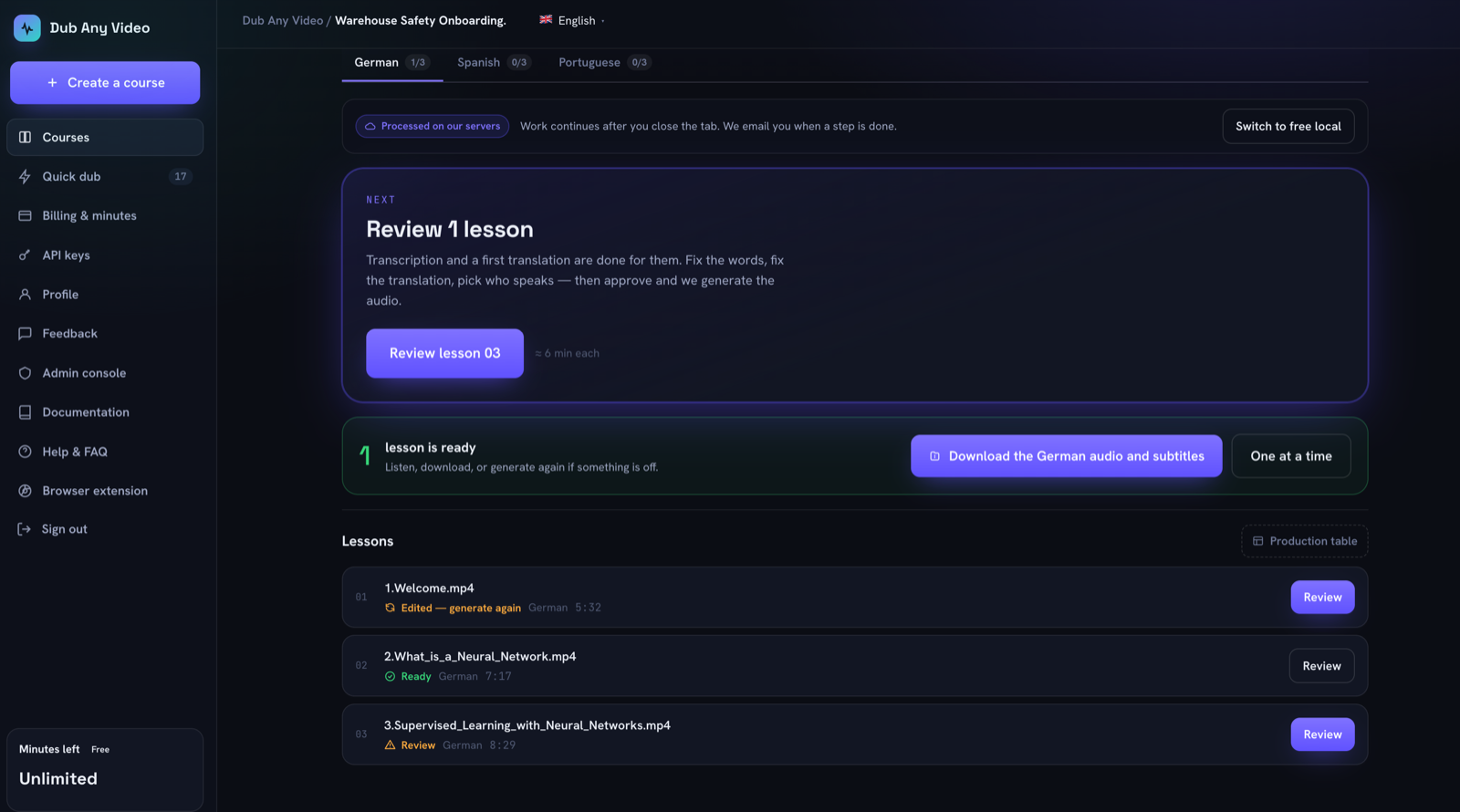 Lesson 01 was edited after it was voiced, lesson 02 was not. The audio for both is still downloadable; only one of them still matches its script.
Check the wording as well as the behaviour. A state called something the buyer has to learn is worse than a sentence, and the sentence has to say what to do about it.
9. Retry and recovery
Things fail. A source URL goes dead, a job dies, one language comes back empty. Ask whether you can restart a single lesson without disturbing the other thirty-nine, generate one language rather than all of them, and what happens to work you cancel. For anything metered, the honest answer is that queued work can be cancelled and refunded while work already running will finish and be billed. A vendor who promises they can always cancel and always refund is describing a queue, not a GPU.
10. Exports
Ask for the file list before you buy. You want audio and subtitles per lesson per language, named so a file can be traced back to its lesson without opening it, plus a bulk download filtered to one language, because that is how a handoff to a regional team actually happens. Ask how long generated files stay available and get a date rather than a promise. Ask for both the translated and the original-language subtitle file, since captions and dubbed audio usually ship together.
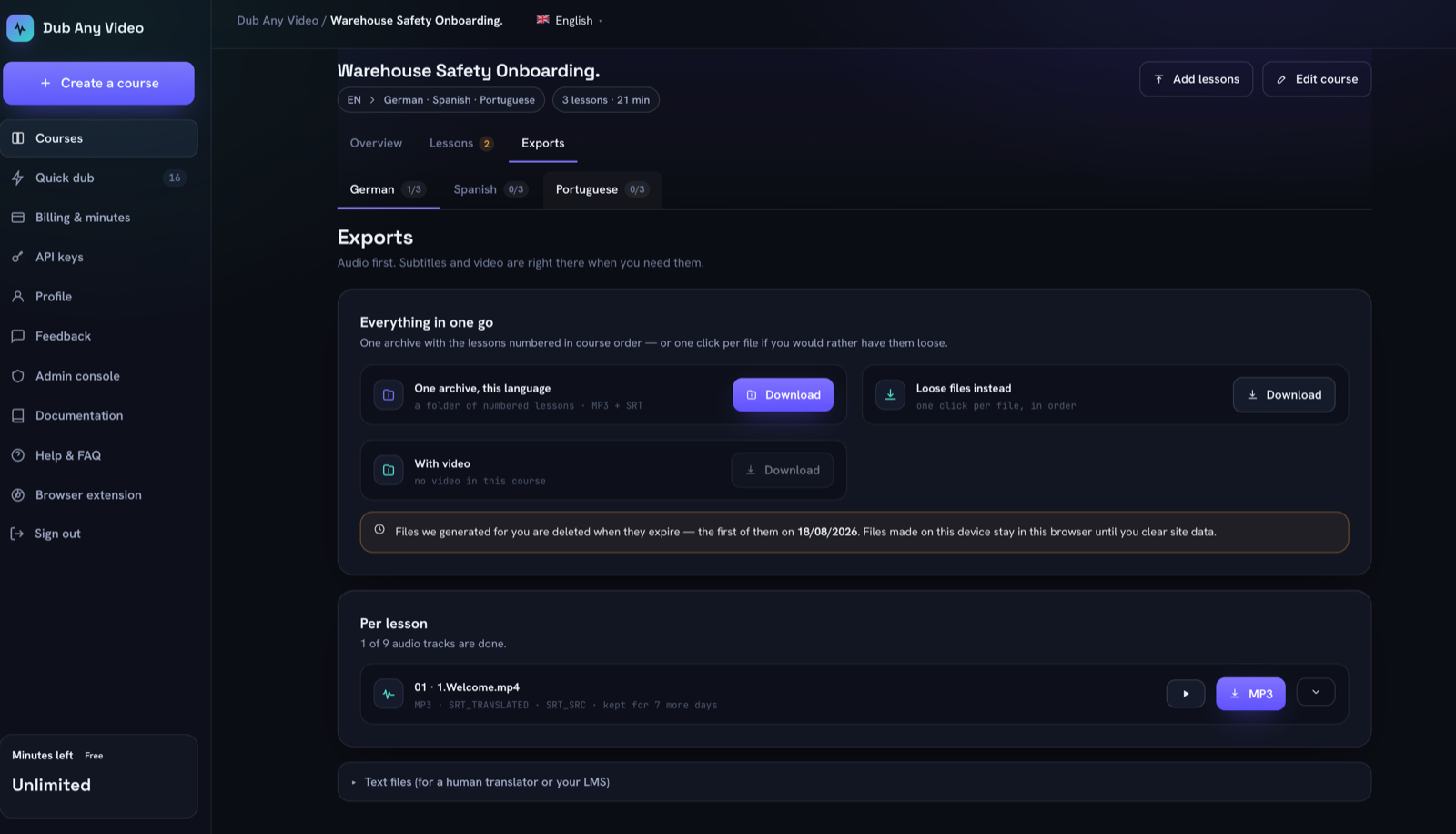 One language at a time, one archive or loose numbered files, and the expiry date written out instead of a vague retention promise.
Local, provider, or vendor cloud?
Where the work runs is a procurement question, not only a speed question, and the market offers three shapes.
Some tools run in your browser: media stays on the device, the tab has to stay open, and you work one lesson at a time. That is the strongest privacy story available and the weakest scale story. Some run on your own provider keys, so the content travels to a vendor you already have a contract with, which helps when legal has cleared that vendor and nobody else. The rest run in the vendor's cloud, where work continues after you close the tab and generated files sit on their storage until they expire.
The useful question is which of the three applies to which step. Plenty of tools keep the video local and still send the text to a public translation endpoint, so the words leave the building even though the video never does. Ask for that breakdown step by step, in writing.
Ask how outputs are marked
Two rules that were theoretical last year became operative on 2 August 2026, nine days before this was written.
Article 50 of the EU AI Act requires providers of generative AI systems to mark synthetic audio, image, video and text in a machine-readable format so it can be detected as artificially generated, and requires deployers to disclose deepfakes to people in a clear, human-perceivable way rather than leaning on the embedded mark alone. Systems already on the market before that date have until 2 December 2026 for the marking part. California's AI Transparency Act, SB 942 as amended by AB 853, became operative the same day and asks covered providers to embed latent machine-readable provenance in generated images, video and audio, and to publish a free detection tool.
The technical answer most vendors reach for is Content Credentials, the C2PA standard whose steering committee includes Adobe, Amazon, BBC, Google, Meta, Microsoft, OpenAI, Sony and TikTok. A C2PA manifest records that an action was performed by an AI system through a digitalSourceType field, and pairs a cryptographic hash with a watermark so the record survives a re-encode.
Whether any of this binds you depends on where you operate and where your learners are, which is a question for your own counsel. The vendor question is narrower: does the audio you hand me carry machine-readable provenance, and if not, who is expected to add it? Retrofitting disclosure across a published library costs far more than deciding it once.
Pilot test: three lessons, two languages
Do not evaluate on the vendor's sample. Use your own worst content. Copy this script and run it against each candidate.
Setup
  Pick 3 real lessons from one course:
    L1  clean single-speaker audio, contains 2 product names and 1 number
    L2  two speakers, at least one interruption or overlap
    L3  a lesson you have edited before, so you know what a correction feels like
  Pick 2 target languages your business actually needs.

Run
   1. Create the course, add all three lessons, set both languages.
   2. Time how long until the first lesson is ready for review. Note it.
   3. In L1: find one ASR error in the source. Fix it. Confirm the translation
      updates or is flagged.
   4. In L1: add a glossary term for a product name. Open L2 and L3 and check
      whether the existing translation changed.
   5. In L2: merge or split one speaker. Reassign one line to the other speaker.
   6. Set one voice for every female speaker and one for every male speaker
      across the course. Override the voice in L3 only.
   7. Approve and generate L1 in both languages. Do NOT approve L2 and L3.
      Confirm nothing was voiced without approval.
   8. Edit one line of L1 after generation. Look at the state of the two
      finished outputs.
   9. Regenerate L1 in ONE language only.
  10. Export: download both languages of L1 separately. Open the files.

Record for each candidate
  - minutes from upload to first reviewable transcript
  - number of corrections needed in L1 source (per minute of audio)
  - did the glossary change existing translations?  yes / no
  - did edits survive regeneration?                 yes / no
  - was anything voiced without approval?           yes / no
  - could you regenerate one language alone?        yes / no
  - do outputs carry machine-readable provenance?   yes / no
  - filenames traceable to lesson and language?     yes / no
Three lessons is enough to expose consistency problems and small enough that you can run two or three tools in parallel in an afternoon.
Red flags
- Final audio produced without an explicit human confirmation, especially when that is sold to you as a time saver.
- Accuracy percentages with no method behind them. "99% accurate" with no language pair, no domain and no test set is marketing copy.
- Every lesson arriving as a separate submission with its own settings and no shared state, which is a clip tool with a course label on the pricing page.
- No published maximum for lessons, languages, file size or retention. Ask during the sales conversation, while somebody still wants to answer.
- Nobody at the vendor can say whether generated audio carries provenance metadata, or the answer changes depending on who you ask.
- Lip sync and voice cloning in the headline. Both are real technologies with real uses. For most training content they are not required, they carry consent and rights questions, and they tend to draw attention away from missing review controls. If you do need them, buy and review them as a separate decision.
Decision scorecard
Score each criterion 0 (absent), 1 (partial), 2 (fully supported), and put evidence from your pilot in the notes column instead of an impression. The table below ships empty on purpose. A scorecard that arrives pre-filled by a vendor is an advertisement.
| Criterion | Tool A | Tool B | Tool C | Evidence from pilot |
|---|---|---|---|---|
| Course structure | ||||
| Editable source text | ||||
| Editable translation | ||||
| Terminology | ||||
| Speakers | ||||
| Voice defaults and overrides | ||||
| Approval gate | ||||
| Stale handling | ||||
| Retry and recovery | ||||
| Exports | ||||
| Total (max 20) |
A tool that scores 14 with a real approval gate and working terminology will serve a course library better than one that scores 18 on convenience and zero on review.
How Dub Any Video answers the checklist
Our own scores, zeros included, since you would find those in week two anyway.
Lessons and languages are first class. A course holds up to 200 lessons and up to 10 target languages, and every lesson by language pair carries its own state: waiting, generating, ready, stale or failed. Transcript and translation are both editable, and the machine's original text is kept beside your corrected version instead of being overwritten. A glossary term rewrites the translations that already exist, whole-word and case-sensitive, across every lesson in the course. Speakers can be merged, reassigned and re-gendered. Voices can be set for every speaker of a gender across the whole course, with per-lesson overrides.
Nothing is voiced until you press Approve. On our servers the first pass starts on its own once a lesson is added, transcription and speaker detection and a first translation together, and that is a draft rather than a deliverable. Editing an approved lesson marks its finished languages as edited, which leaves the old file downloadable and spends none of your minutes until you ask.
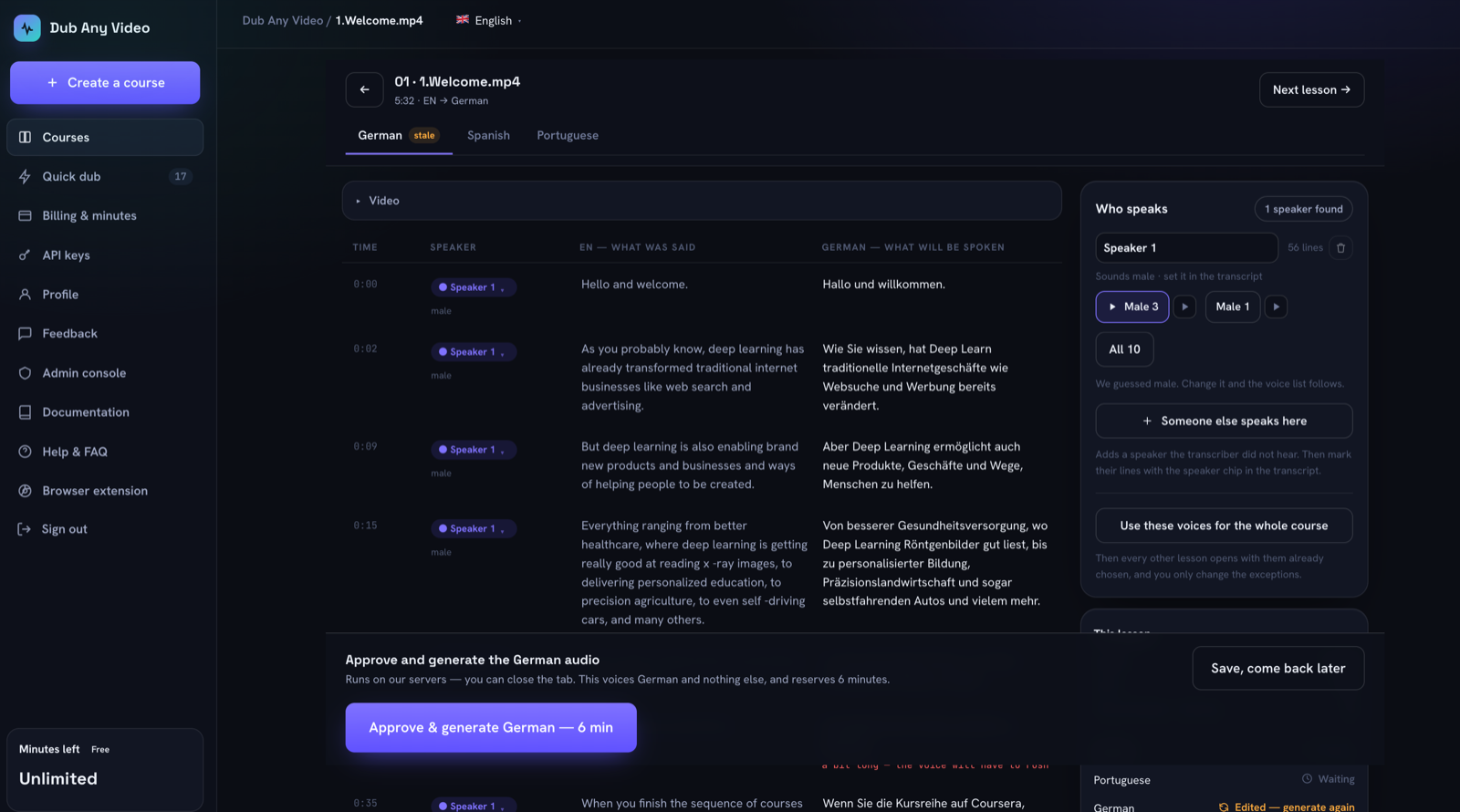 The same state on the lesson itself. German was voiced, then a line changed, so the tab says so before you spend anything regenerating it. A failed lesson can be retried on its own, one language can be generated without the others, and queued work can be cancelled with its minutes returned, while work already running on the box finishes and is charged. Exports are per lesson per language, audio plus translated and original subtitles, with the expiry date shown instead of a retention promise.
The zeros: no LMS or SCORM integration, no shared review with per-reviewer roles, no lip sync, no voice cloning, and a course belongs to one account. Our exports carry no C2PA Content Credentials today either, so provenance has to be added downstream. If any of that is a hard requirement, it is a fair reason to buy something else, and better learned here than in week three.
The workflow these controls exist to support is described step by step in How to Translate a Video With AI.
FAQ
What is the difference between eLearning video localization and video translation?
Translation converts the words. Localization covers the decisions around them: consistent terminology, one narrator who stays the same person, units and examples that fit the target market, and a review pass by someone who knows the subject.
Is course translation software worth it for a single video?
No. For one file, a single-file dubbing tool is faster and cheaper. Course structure starts paying for itself when lessons share vocabulary, share voices and get updated.
How do I evaluate voice over translation software for online learning without a long trial?
Run the three lesson pilot above. It takes an afternoon, exercises consistency and review rather than audio quality alone, and gives you evidence you can put in front of a budget holder.
Can AI dubbing for training videos replace a human reviewer?
Not for content anyone is graded or certified on. Speech recognition mishears domain terms and machine translation makes confident errors in the places that matter most: numbers, negations and regulated wording. Budget review time per lesson, and count a tool that removes the review step as a risk on your side of the ledger.
Do learners need to be told the audio is AI generated?
Increasingly, yes, and the deadline has already passed in two large markets. Article 50 of the EU AI Act and California's AI Transparency Act both became operative on 2 August 2026, covering machine-readable marking of synthetic audio and human-visible disclosure of deepfakes. What applies to you depends on your location and your learners, so ask your counsel. Disclosing anyway is cheap.
Start with the pilot, not the purchase
Score the ten criteria against your own worst three lessons before you sign anything. If you want to run that pilot against a workspace built around lessons, terminology and an explicit approval gate, create a course and localize the first lesson today.