Developer blog
From HLS to MP4: How a Video Translator Extension Works
Most video on the web is not a file you can save. It is a playlist of a few hundred short segments that a player stitches together in memory, which is why "save video as" is missing from the menu and why a captured stream is usually unusable afterwards.
This is what our browser extension does about that, and where it stops.
The direct answer
It watches the tab you are on, lists the unprotected media it sees, and turns an HLS playlist into one flat MP4 file on your machine. Then it hands the original URL to the dubbing workspace so you can translate what you captured.
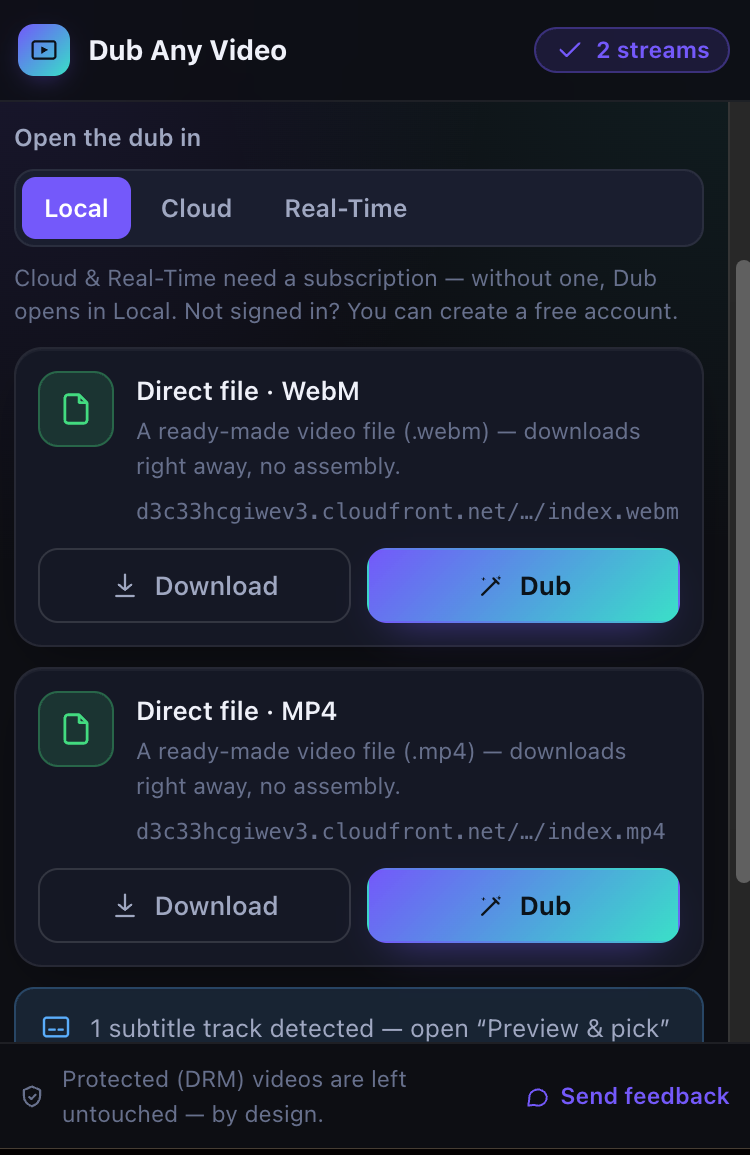 Two streams found on one page. Each row says what it is, what saving it will involve, and where the bytes come from; the footer states the DRM boundary rather than hiding it.
It does not overlay live subtitles, translate audio in real time, or bypass any protection. A DRM-protected stream is excluded from the list before you can click anything, not attempted and failed. There is no site whitelist and no promise that every site works, because whether a stream can be captured is a property of the stream.
MP4 and HLS, briefly
A direct MP4 is one file at one URL: the extension hands it to Chrome's download manager and the browser fetches it from its host.
HLS is a playlist. A master lists variants at different bitrates, each variant points at a media playlist, and that lists the actual segments, a few seconds each, in either MPEG-TS or fMP4. Nowhere in that structure is there a file to save. You fetch every segment and build one yourself.
What it is allowed to watch
| Permission | What it is for |
|---|---|
webRequest |
read response content types, the most reliable signal for an extensionless media URL |
webNavigation |
notice a committed navigation so the previous page's streams are dropped |
downloads |
hand a file to Chrome's download manager |
tabs |
know which tab the popup is asking about |
storage |
survive the MV3 service worker being suspended |
| host permissions on http and https | observe any page you visit and fetch segments from their host |
That last row is broad, and it is the cost of a tool that has to work on sites nobody enumerated in advance. Nothing routes through our servers: segments go from their own host into your browser.
Per-tab detections live in memory and are mirrored into chrome.storage.session, because an MV3 worker is suspended after roughly half a minute of idling and someone returning to the tab would otherwise find an empty list. The mirror is wiped on navigation, reload and tab close, so a new page never shows the old page's streams.
How a stream gets on the list
Two sources feed the same classifier: the background worker reads content types off onHeadersReceived, and the content script walks <video> and <source> elements, skipping blob: and data: URLs because those are not addressable. Classification is deliberately blunt. A .m3u8 extension or an HLS MIME type makes it HLS, .mp4 or video/mp4 a direct file, same for WebM, and anything else is dropped rather than guessed at.
Protection is checked first, by signal rather than by outcome. The content script marks a <video> protected when it fires an encrypted event or has MediaKeys attached, and the classifier additionally drops any candidate whose URL or content type mentions Widevine, PlayReady, FairPlay, ClearKey or a license endpoint. Those candidates never become list rows.
The HLS pipeline
  master.m3u8
     |  parse, pick the highest BANDWIDTH variant
     v
  media playlist  --->  reject if EXT-X-KEY (encrypted)
     |                  reject if no EXT-X-ENDLIST (live)
     |                  reject if no segments
     |
     +--> AUDIO="grp" with its own URI? then the audio playlist too
     v
  fetch segment 1  ->  sniff container
     |                 0x47 at 0 and 188  -> MPEG-TS
     |                 ftyp/styp/moof/... -> fMP4, prepend EXT-X-MAP init
     v
  fetch the rest, in order, from their host, with progress
     |   plain URI            -> whole segment
     |   EXT-X-BYTERANGE      -> Range: bytes=off-end of one file
     v
  concatenate in memory
     v
  ffmpeg.wasm  -i video.(ts|mp4) [-i audio.(ts|mp4) -map 0:v:0 -map 1:a:0]
               -c copy -movflags +faststart out.mp4
     v
  flat progressive MP4  ->  Chrome's download manager
The refusals happen before any bytes are downloaded. An encrypted or live playlist is rejected from its tags, so nobody waits ten minutes to be told no.
The container is sniffed rather than assumed from the file extension, because segment URLs lie routinely. MPEG-TS is recognised by its sync byte at offset 0 repeating at 188; an fMP4 fragment by its box type at offset 4. An unrecognised container is refused rather than fed to ffmpeg on the hope that something plays.
And ffmpeg runs -c copy, which is a container change with no re-encoding. The video and audio bitstreams that come out are the ones that went in, which is both why it is fast enough to do in a tab and why the output cannot look worse than the source.
The ffmpeg core, its wasm and its worker are loaded from the extension's own package through chrome.runtime.getURL, never from a CDN. Remote code is a Chrome Web Store violation, and keeping everything local is also why the import is lazy: saving a direct MP4 never pulls the core in at all.
Why flat matters
-movflags +faststart puts the moov atom before mdat. A fragmented MP4 plays fine in a browser and behaves badly everywhere else: its header duration is the 0xFFFFFFFF sentinel rather than a real number, so seeking is unreliable and any tool that reads duration up front gets nonsense.
So the output is verified rather than trusted. The check walks the top-level boxes and asserts that moov precedes mdat, that no top-level moof exists, and that the mvhd duration is real. A file that fails is an error, never a download.
Two shapes that break naive downloaders
Writing this article turned up two playlist shapes the pipeline handled badly. Both are fixed now, and both are worth describing, because any downloader you write will meet them.
The first is byte-range addressing, where the playlist points every segment at the same file and gives a range inside it:
#EXT-X-MAP:URI="main.mp4",BYTERANGE="720@0"
#EXTINF:6.00000,
#EXT-X-BYTERANGE:4545045@720
main.mp4
#EXTINF:6.00000,
#EXT-X-BYTERANGE:4502841@4545765
main.mp4
A parser that reads only URIs sees the same file a hundred times. Apple's own fMP4 sample stream is built this way: 100 segments, one 430 MB file, so the naive reading downloads roughly 43 GB for ten minutes of video. The fix is to carry the range and send Range: bytes=720-4545764. An omitted offset continues where the previous range ended, and a host that ignores the header and returns the whole file is refused rather than concatenated into something enormous and broken.
The second is audio in its own rendition. A master can declare #EXT-X-MEDIA:TYPE=AUDIO with a URI and point variants at it by group, so the variant's own segments carry no sound and downloading it alone produces a silent file. The CODECS attribute will not warn you: it lists the codecs of the whole presentation, audio group included. The reliable signal is the group. If the variant names an AUDIO group whose rendition has a URI, that audio is a second download, and ffmpeg gets both inputs with explicit -map arguments.
A real run
Everything below is from a run on public test streams on 2026-08-11. The remux was done on the command line with the same arguments the extension passes to ffmpeg.wasm, which is a faithful check of the pipeline's shape but not a measurement of the extension itself.
The Mux public test master listed five variants; the highest was BANDWIDTH=6221600 at 1920x1080, which is what the picker takes. Its media playlist was VOD, 64 segments, 634.567 seconds, no EXT-X-KEY and no EXT-X-MAP. The first segment began with 0x47 and had 0x47 again at offset 188, exactly what the sniffer looks for.
Three of those segments were concatenated and run through the same arguments:
cat seg0.ts seg1.ts seg2.ts > concat.ts
ffmpeg -i concat.ts -c copy -movflags +faststart out.mp4
25,004,000 bytes in, a 24,316,874-byte MP4 out. Its top-level boxes came out as ftyp, moov (68,486 bytes), free, mdat, in that order, with no moof anywhere, and ffprobe read a duration of 30.022989 seconds over an h264 1920x1080 video track and an AAC audio track.
The direct-file case needs no pipeline: a HEAD on a public sample MP4 returned 200, video/mp4, 991,017 bytes, accept-ranges: bytes. The extension hands that URL to Chrome and gets out of the way.
The two fixes were checked against Apple's sample stream by driving the real downloader from Node with a stub in place of ffmpeg.wasm. Two segments of the 1080p variant plus its audio rendition came to 9,048,606 bytes of video and 242,907 of audio, fetched as five ranged requests instead of five whole-file downloads. Handing both buffers to ffmpeg produced a 9,296,896-byte MP4: ftyp, moov, free, mdat, 12.000000 seconds, and two streams, h264 1920x1080 and AAC.
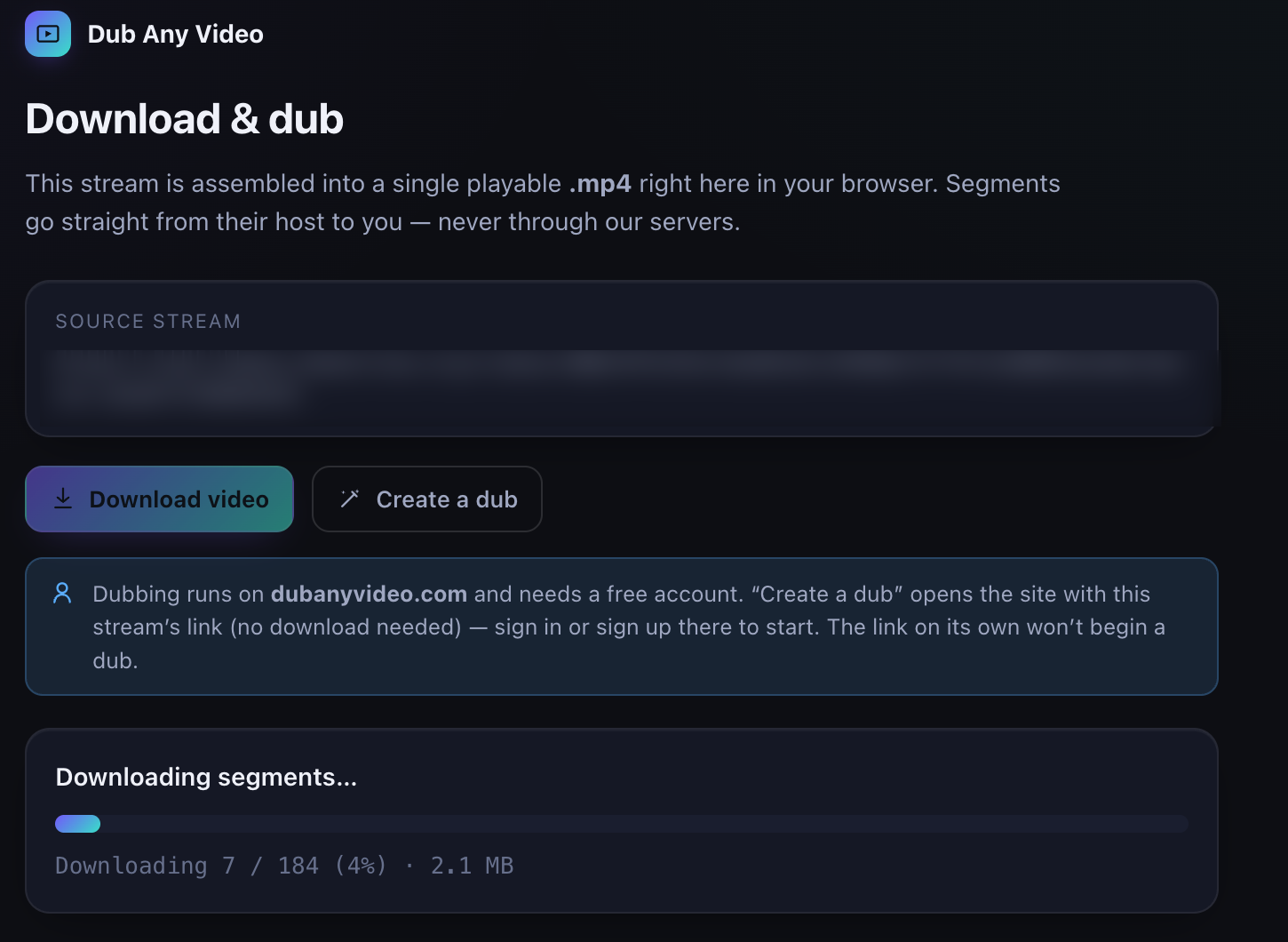 Assembly runs on its own page rather than in the popup, which can be closed by a stray click. The source URL is redacted here; the count is real, and "Create a dub" is live from the first second because it does not need the download.
Where it stops
Some of these are policy and some are limits, so they are worth separating.
Policy: DRM-protected media is excluded, encrypted HLS is refused, live playlists are refused. Whether you are allowed to capture something is your call and your responsibility; the extension only refuses what it should never attempt.
Limits you can still meet. DASH is out of scope entirely. A host that requires a session cookie, a signed URL or a referer check answers with an HTTP error, which is surfaced rather than worked around. Assembly happens in memory, so a very long video can exhaust the in-browser ffmpeg build and fail with a clear message instead of a file. And when a stream keeps several audio renditions, the one belonging to the chosen variant's group is the one you get; picking a language by hand is not a control that exists yet.
Subtitles get detected and can be downloaded next to the video, from an HLS master's subtitle renditions or a page's <track> elements. The deep link already carries a subtitle_url parameter, but the site does not read it yet, so attaching a subtitle to a dub is still a manual step today.
The handoff
The "Create a dub" button opens /dubbing?source_url=<the original URL> and is active immediately, without waiting for any download. What travels is the original playlist or file URL, never a blob: URL, which would be meaningless in another tab. For a direct MP4 that link is all you need. For HLS you usually want the file the extension just assembled, so save first and dub the saved file.
Troubleshooting
| What you see | What it means | What to do |
|---|---|---|
| The list is empty | nothing media-shaped was requested yet, or the player uses blob: sources with no addressable URL |
start playback, then reopen the popup |
| A stream you can see is not listed | it is EME-protected, or its URL matched a DRM signal | nothing to do; this is the boundary |
| "This HLS stream is encrypted" | the playlist carries EXT-X-KEY |
nothing to do |
| "This looks like a live HLS stream" | no EXT-X-ENDLIST in the playlist |
wait until the recording is finished and published as VOD |
| "Couldn't download an HLS segment (HTTP 403)" | the host requires auth, a signed URL or a referer | open the media in the tab it belongs to; expired signed URLs cannot be reused |
| "ffmpeg.wasm failed while remuxing" | the in-memory build hit its ceiling on a very large video | capture a shorter piece, or use a lower-bandwidth source |
| "the server ignored the range request" | a byte-range playlist whose host answers with the whole file | nothing to do; assembling it would build a broken file |
| The MP4 plays but seeks badly | not from this pipeline, which verifies flatness before saving | check where the file actually came from |
FAQ
Does it work on YouTube?
No, and treat any extension that claims otherwise with suspicion. The extension captures open, unprotected streams; it does not defeat platform protections or terms.
Is this a real-time translator?
No. It captures media and hands it to the dubbing workspace. Translation happens there, on a finished file, with a review step in between.
Does the video pass through your servers?
No. Segments are fetched from their own host into your browser, and the assembly happens in the tab. What reaches us is a URL, when you choose to press the dub button.
Which browsers?
Chrome 116 and later, per the manifest.
Try it on something you own
Install the extension, open a page with an unprotected stream and watch the list fill as playback starts. Save the MP4, then dub it in your browser to see the other half of the trip. The in-browser dubbing writeup covers what happens to that file afterwards, and the walkthrough shows the full course path if you have more than one video to do.