Developer blog
Building Private In-Browser Dubbing With WASM and WebGPU
A privacy claim is only worth what someone can check in the Network tab, so this piece names hosts rather than making one.
Your video is not uploaded. A handful of assets are still downloaded, which is a weaker claim than "zero network" and the one the code actually supports.
What runs where
  your machine, one tab
  +-------------------------------------------------+
  |  media file  ->  IndexedDB  <-  cues, clips,     |
  |                               finished tracks    |
  |        |                          ^              |
  |        v                          |              |
  |   ffmpeg.wasm worker         Web Audio           |
  |   extract / stretch / mux    assemble / mix      |
  |        |                          ^              |
  |        v                          |              |
  |   TTS worker  ->  per-line WAV ---+              |
  |   (Piper, ONNX Runtime)                          |
  +-------------------------------------------------+
        |                    |                 |
        v                    v                 v
   our origin          huggingface.co     jsdelivr.net
   page, ffmpeg,       voice models       onnxruntime
   supertonic assets                      + phonemizer

   optional, only if you ask for them:
   your ASR provider (audio + your key)
   translate.googleapis.com (line text, no key)
Everything inside the box is browser memory and browser storage. Everything below it is a download, except the two optional paths, which are the only ways content leaves the machine.
The media never moves
A local lesson keeps its content in IndexedDB, in a database called browser-dubbing, currently at version 7. The source media blob, the parsed lines, the per-line audio and the assembled track are all records there. IndexedDB stores Blob natively, so there is no base64 round trip inflating everything by a third on the way in.
Records are keyed by a content-derived id: SHA-256 over the file's name, size, modification time and its first 64 KB. That id exists so reopening the same file lands on the same record instead of creating a second one, and it never leaves the browser. WebCrypto only exists in a secure context, and crypto.subtle is undefined on a bare LAN IP, which used to throw before the video state was set and leave the Generate button mysteriously disabled. There is an FNV-1a fallback for that case now.
When a lesson belongs to a course, the server holds the shell of it, and only the shell: the title, the target languages, the lesson order, and the state of each lesson in each language. That is enough for the course list and the production table to tell the truth about a free course without holding a byte of its content.
Storage limits are the browser's business. A failed write is caught, matched against QuotaExceededError and Firefox's older code 22, and re-raised as an error carrying navigator.storage.estimate(), so the message says how much room is actually left instead of showing a raw DOMException. We hardcode no threshold of our own; the disk decides.
Where the assets come from
Nothing model-shaped is bundled with the page, and the download sources differ per engine.
Piper voice models are fetched at synthesis time from HuggingFace, from rhasspy/piper-voices. The library defaults to a smaller mirror, so the worker patches fetch to redirect those URLs; without that, languages like Hindi and Bulgarian do not resolve. The library caches what it downloads in OPFS, which is why the first lesson in a new language pauses and the tenth does not.
ONNX Runtime's own wasm files come from jsDelivr, pinned to the exact installed version:
const ONNX_WASM_BASE = 'https://cdn.jsdelivr.net/npm/onnxruntime-web@1.26.0/dist/'
That line is a workaround. The Piper wrapper hardcodes a cdnjs path for onnxruntime-web 1.18.0 and force-assigns it over anything you pass; that version is mismatched against the installed runtime, its jsep module (the WebGPU one) fails to fetch, and the session dies with "no available backend found". Pinning the base to the version actually installed is what makes WebGPU reachable at all, and the two have to be bumped together.
ffmpeg is the opposite choice. The core, its wasm and the class worker are served from our own origin under /ffmpeg, single-threaded rather than the core-mt build, which means no COOP/COEP headers are required for the whole site. Loading core from a CDN through toBlobURL failed outright, and passing an explicit classWorkerURL avoids depending on the bundler to resolve the library's internal new Worker(new URL(...)).
The premium browser engine, SuperTonic, is four ONNX files totalling roughly 398 MB, streamed from our origin into a separate IndexedDB database and cached there. That is large enough to matter on someone's connection, so the page checks whether all four are already present before warning about the download, and there is a control to evict them again.
Nothing heavy on the UI thread
Three workers are in play: Piper's, SuperTonic's module worker, and ffmpeg's own class worker. Synthesis never touches the main thread, and neither does audio extraction, time-stretching or muxing.
Progress arrives as messages rather than as an invented spinner. A voice download reports loaded and total bytes, which the run shows as a percentage next to "this happens once, then every lesson reuses it", because a first lesson slower than the second one reads as a broken product. A render reports the line it is on and how many lines it did not have to make again.
WebGPU is preferred, and then it is not
The selection itself is small:
function currentProviders(): string[] {
  if (forceWasm || !gpuAvailable()) return ['wasm']
  return ['webgpu', 'wasm']
}
// Error signatures that mean "WebGPU EP can't run this model" -> fall back to WASM.
const WEBGPU_FAILURE = /webgpu|unsupported data type|gathernd|kernel .*failed/i
Those providers are injected by patching InferenceSession.create, because the Piper wrapper exposes no knob for them. On a machine with navigator.gpu, the session is created asking for WebGPU first.
Then it fails at run time. Piper's models are VITS, and the duration predictor uses GatherND with int64 indices, which the WebGPU kernel rejects with "Unsupported data type: 7". ONNX Runtime does not fall back per operator once the graph has been partitioned, so there is no graceful degradation inside the session. The worker catches the failure, flips itself to WASM for the rest of its life, drops the half-built session and retries the same line. The page records that too, and re-arms the flag on every subsequent worker restart, otherwise WebGPU would be re-attempted and re-fail every 25 lines.
So the honest version is narrower than the feature name suggests: with this model family and this runtime, asking for WebGPU gets you one failed attempt and then WASM, which is worth knowing before anyone plans a roadmap around GPU-accelerated TTS in a tab.
Where the memory goes
Most of the awkward-looking code in this pipeline is there because of the wasm heap.
The TTS worker is restarted every 25 syntheses. There is no leak we can point at; WASM memory simply grows across calls, and a 300-line lesson does not survive the run otherwise. An error matching a small set of out-of-memory signatures also triggers a restart and one retry, so a long render recovers instead of ending somewhere in the middle.
ffmpeg gets the same treatment from a different angle. Each cue that needs a time stretch is one atempo pass, and the instance is torn down and rebuilt every six of them. Export operations never call writeFile with a large input at all: the video blob and the mixed audio are mounted read-only through WORKERFS, which reads lazily from the browser heap rather than copying an entire file into MEMFS.
One bug is worth naming because it wore a disguise for a long time. Long-video exports failed with "memory access out of bounds", which reads exactly like an out-of-memory problem. It was not. This build of ffmpeg-core has a broken libopus, and any -c:a libopus encode crashes instantly regardless of input length, while libvorbis, libmp3lame, aac and pcm all handle an hour of audio without complaint. WebM exports use libvorbis now and MP4 uses aac.
The mixing itself was moved out of ffmpeg for the same reason. The ducked original and the dub are decoded and summed in one OfflineAudioContext at 48 kHz, at the same balance the live player uses, and ffmpeg is left with a single job: copy the video stream untouched and encode one audio track.
| Constant | Value | Where | Why it exists |
|---|---|---|---|
| Worker restart interval | every 25 syntheses | tts.ts |
bound WASM memory growth across a long lesson |
| ffmpeg reset interval | every 6 stretches | assemble.ts |
same, for the atempo path |
| Speech speed-up cap | 1.3x, or 1.75x when exporting | syncPlanner.ts |
1.3 avoids motor-mouth; export has no slowdown step to lean on |
| Video slowdown floor | 0.8x | syncPlanner.ts |
an owner-set bound on how far the picture may drag |
| Export mix rate | 48000 Hz | assemble.ts |
a clean target for AAC, and Opus's native rate |
| Duck / dub gain | 0.1 / 1.3 | assemble.ts |
mirrors the live player exactly |
| Transcription chunk | 6 min, 5 s overlap | assemble.ts |
short requests, real progress, no 413 |
| SuperTonic model set | about 398 MB | supertonicModelLoader.ts |
warn before spending someone's bandwidth |
These are constants read from source, not benchmarks. There is no timing, throughput or memory figure in this article, because none was measured for it.
Resume is per line, not per stage
The quick single-video path resumes at stage granularity: reopen it and every line is synthesized again. That is tolerable for one video and absurd for a fourteen-lesson course, so the course path uses the line as its unit.
Every synthesized line is written to IndexedDB the moment it exists, together with a hash of the exact text it was made from. A resumed run compares hashes and re-renders only what is missing or what was edited since. Pressing Stop finishes the line in flight, because throwing away half a line of work to be responsive is a bad trade, and returns a status that the UI treats as a normal outcome rather than a failure.
Storing that hash is the kind of detail that looks optional while you are writing it. Without it, editing a line after a partial render leaves the old wording spoken in the finished track, and nothing on screen would tell you.
What comes out
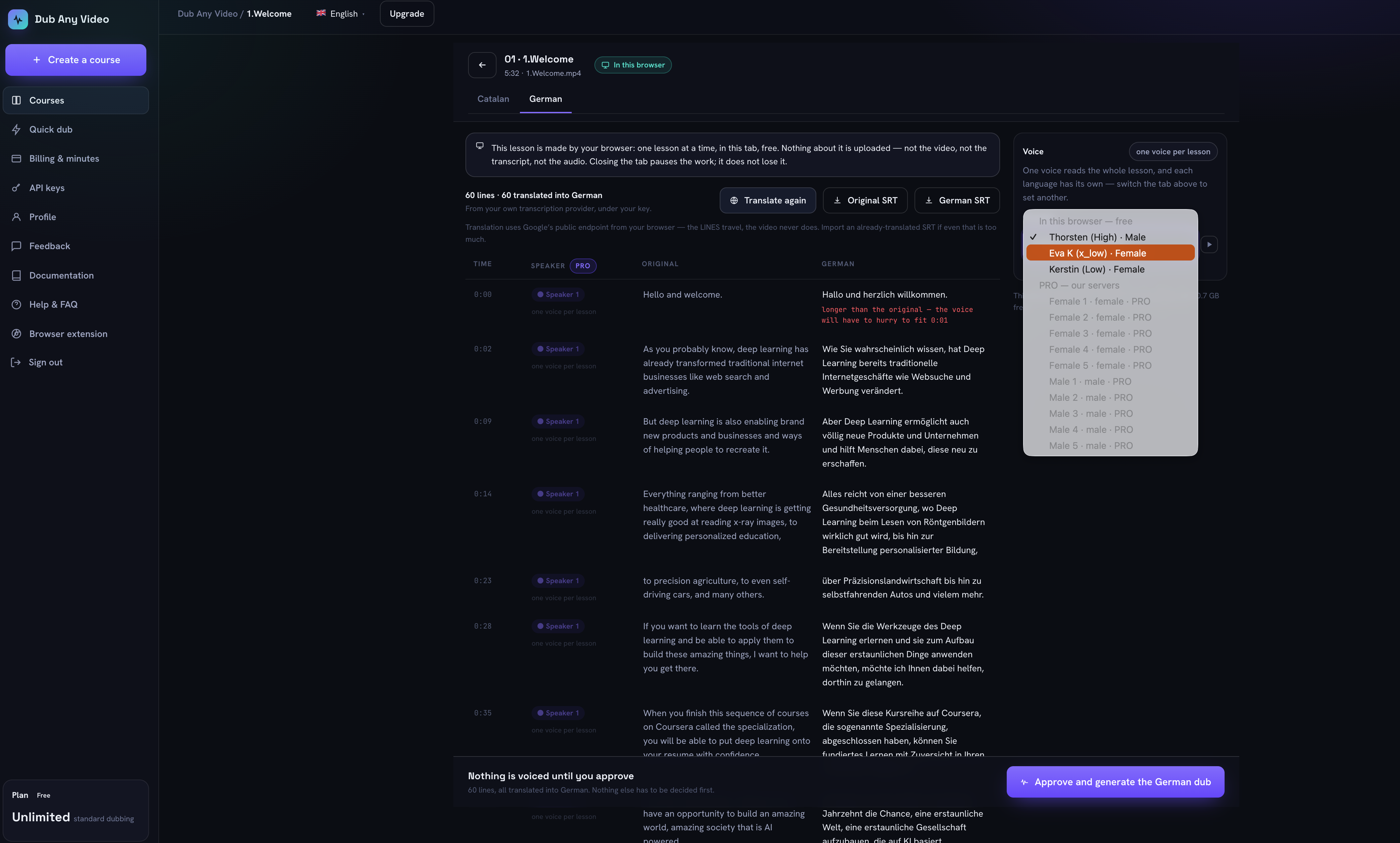 The local review screen: three on-device German voices offered, the premium ones listed as unavailable rather than hidden, the speaker column marked PRO, and a chip stating one voice per lesson.
A finished lesson gives you a WAV track and an SRT, per language, plus a zip of the whole course with a folder per language and both transcripts sitting next to each track. None of those are links to a server file, because there is no server file: no expiry date to warn about, and no copy to restore if the machine is lost. The exports screen says that in those words before it lists anything.
The single-video path can also produce a dubbed MP4 outright: video stream copied without re-encoding, audio premixed in Web Audio. That export is refused for tracks planned in the mode that slows the video per region, because a plain mux cannot reproduce a variable video rate. Refusing is better than shipping a file that drifts.
What a tab cannot do
There is no diarization in the browser at all. The transcription path never produces a speaker field, so a local lesson is read start to finish by one voice; the review screen says so on a chip instead of showing a control that does nothing. Separating speakers is server work here.
Neither path does lip sync or voice cloning. The tab has to stay open, and one lesson runs at a time. The voice catalogs also diverge: a browser speaks 39 languages through Piper, our servers speak 31 through SuperTonic, 26 are shared, and a spec fails the build if those lists drift apart. Local synthesis is desktop-class work, and a phone is the wrong machine for it.
Checking the boundary yourself
Open DevTools before starting a local lesson and sort the Network tab by domain.
With an imported SRT and an imported translation, the only hosts you should see are our origin, huggingface.co for the voice model, and cdn.jsdelivr.net for the ONNX Runtime and phonemizer wasm. If you asked for a transcript, add your chosen provider, carrying the extracted audio and your own key, and note that it goes browser to provider with no hop through us. If you translated with the free option, add translate.googleapis.com, carrying the text of your lines and no key.
What you should never see is your media file being posted anywhere. Then open the Application tab: browser-dubbing holds the video, the lines and the audio, supertonic-models holds the premium ONNX cache if you ever downloaded it, and OPFS holds the Piper voices. That is the whole storage footprint, and clearing site data removes all of it.
What I would tell someone building this
Serve your own wasm wherever the size lets you. Every remaining CDN dependency here is a fix for a broken library default or a deliberate trade for a large asset, and each of them is a version that can rot on its own schedule, outside your lockfile.
Pick the unit of resumability early, because retrofitting it is worse than choosing it. Stage-level resume looks perfectly reasonable until the first fourteen-lesson job dies at 80%. And expect the memory ceiling rather than the clock to be what stops a run: nearly every limit in the table above is a wasm-heap limit wearing a different name. When you do add a fallback, make it sticky. Retrying something you already know fails is just a slower way to fail.
If you want to see the boundary rather than read about it, dub one lesson in your browser with the Network tab open. The local versus cloud comparison covers which work belongs on which side, and the pipeline walkthrough follows one line through the server path for contrast.