Developer blog
How an AI Dubbing Pipeline Works: ASR, Translation, TTS and Muxing
Dubbing is six machines in a row, and each one treats the previous one's output as fact. Nothing downstream doubts anything upstream, which is where most of the quality goes.
Rather than describe the stages in the abstract, here is one line of one lesson followed all the way down.
The line
In the demo course used throughout this series, lesson 1 is 5 minutes 32 seconds long and holds 56 lines. This is the one that starts at 0:15:
Everything ranging from better healthcare, where deep learning is getting really good at reading x -ray images, to delivering personalized education, to precision agriculture, to even self -driving cars, and many others.
The next line starts at 0:30, so whatever German this becomes has to be said inside roughly fifteen seconds, in the voice assigned to the person speaking.
video or audio file
        |
        v
  ffmpeg extract  .............  16 kHz mono PCM wav
        |
        +----------------------+
        v                      v
   ASR (Whisper)          diarization
   lines + word times     speaker turns
        |                      |
        +----------+-----------+
                   v
   word-level alignment: exactly one speaker per line
                   v
             transcript json
                   v
   ======  human review, then Approve  ======
                   v
   translation   (skipped when the reviewer already supplied one)
                   v
   one voice chosen per speaker
                   v
   TTS: one wav per line
                   v
   mix plan: per-line speed and placement
                   v
   stitch to one 48 kHz track, normalize, fade
                   v
   mp3  +  srt / vtt  +  transcript json   (video mux optional)
Ingest: everything becomes one boring wav
The first thing that happens to your MP4 is that the video gets thrown away. ffmpeg decodes whatever container you brought, drops the video streams, mixes the channels down to mono and resamples to 16 kHz PCM. That shape is what the speech models want, and normalizing to it once means no later stage has to care whether the source was an MP4, an MKV or an HLS playlist.
A file with no decodable audio ends the job here, before anything expensive has run. So does an extraction that produces an empty file, which is treated as a failure rather than as a very quiet video.
Transcription: text with timestamps attached
The wav goes to Whisper, asking for word-level timestamps alongside the segment text. What comes back is a list of lines rather than a document: each line has a start, an end, and the timing of every individual word inside it. Those word timings do more work than they look like they would, since they are what lets a later stage cut a line in the right place and what stops a line from being handed to the wrong voice.
Three cleanups run before anything else sees this output. A dictionary of find-and-replace corrections is applied first, if the account has one: Whisper mishears the same proper nouns consistently in a given channel, and fixing them here means the translator never sees the mistake. Lines with a long silent hole in the middle get split, because Whisper sometimes merges a speaker's intro with a question they ask forty seconds later, and a line whose window is mostly silence makes the dub go quiet over real speech. Then lines get regrouped so each one belongs to exactly one speaker, which needs the next stage.
This whole stage can also be skipped. If you already have subtitles, they can be sent as the timeline and no transcription runs at all, which is what the browser extension does with a video's own captions.
Diarization: who is speaking, offered as a guess
Diarization runs at the same time as transcription, on the same wav, and neither needs the other. It answers a different question: at which points does the speaking voice change, and which stretches belong together.
It produces turns, not lines. Merging the two is a separate step, and it is done word by word rather than by picking whichever speaker overlaps a line the most. The naive version fails in a specific and audible way: a twenty-five second transcript line where the last three seconds belong to somebody else gets voiced entirely by the first speaker, and what a listener hears is the voice switching several seconds late. Walking the words instead, and splitting the line where the speaker tag flips, keeps each line owned by one person.
After the split, each speaker is sampled and classified, which produces a gender guess, a rough age bucket and a sample clip. This is the input to voice assignment, and it is the reason the review screen can say "sounds male" while making it obvious you can override it.
Two failure modes here are the ones you end up fixing by hand. Diarization can merge two people into one speaker, so they share a voice, and it can split one person into two, so they change voice mid-lesson. Neither is recoverable later, because every later stage takes the speaker labels as given. That is why the interface calls them a suggestion. A total diarization failure, on the other hand, does not kill the job: it degrades to a single speaker and the dub ships in one voice.
One case ends the job here instead of dubbing it: silence. If the voice activity detector finds no speech at all, the job is refused with "no speech detected", because a transcriber handed a silent or music-only clip will confidently invent a sentence and the detector will not.
Translation: writing the script that will be read
This is the first stage that produces words nobody said. It runs per target language, in batches, through a chain of providers with fallbacks, and two cases skip it entirely.
If the source language is already the target language, nothing is translated. And if the caller sends lines that a human already reviewed and corrected, those lines are the script. Running the translator over a reviewed translation would overwrite exactly the edits it was sent to preserve, so the review has to be able to say "this text is final, speak it".
A few text fixups run regardless of where the text came from, because they are speech hygiene rather than translation. Stray expression tags get stripped: the synthesizer is supposed to render a breath marker as a breath, and in practice it reads it out as a word. Runs of five or more capital letters get sentence-cased, because Whisper writes shouted speech in capitals and a synthesizer handed a capitalized word spells it out letter by letter; short runs are left alone, since those are usually real acronyms. Typographic punctuation is mapped to characters the synthesizer accepts.
One more thing happens to machine-translated text only. Spontaneous speech often arrives as one long transcript line with no full stops in it, and the translator returns several proper sentences glued together. Those get split into separate cues, with the original line's duration distributed across them by length. Reviewed lines are left exactly as the reviewer arranged them, because their boundaries are a decision, not an accident.
Voices: one per speaker, then synthesis
Voice assignment maps each speaker label to one voice for this language. Left alone, the assignment is deterministic: the same lesson assigns the same voices on every run, so regenerating a language does not silently reshuffle who sounds like whom.
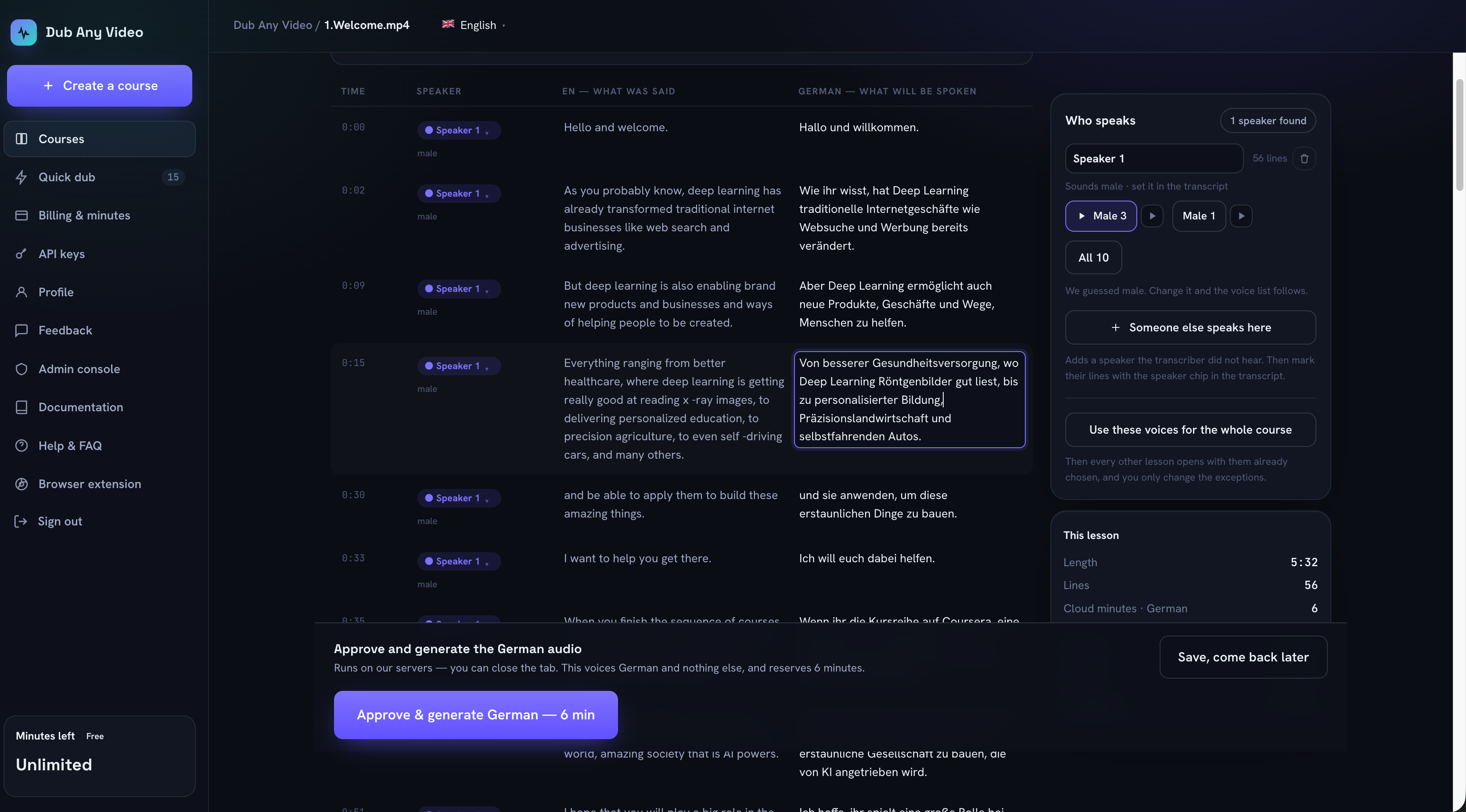 The 0:15 line, its German translation, and the panel where Speaker 1 was given the voice Male 3.
When the caller sends its own voice map, that map is layered on top of the automatic assignment rather than replacing it. A speaker you did not mention still gets a voice instead of crashing the job halfway through synthesis, and a voice aimed at a speaker label that does not exist in this transcript is dropped with a warning rather than quietly applied to somebody else.
Synthesis then runs line by line, several lines at a time, producing one wav per line at 48 kHz. Nothing about timing has happened yet. Each line is simply spoken at its natural pace, which is almost never the pace the video needs.
Timing: fitting speech into a window it was not written for
The planner lays every synthesized line onto an absolute timeline under three rules: lines never overlap, audio is never cut, and drifting later is acceptable. Everything else in this stage follows from those, and this is the stage that decides whether a dub sounds like a dub or like a machine reading over a video.
For each line it works out how much room there is between where the line can start and where the next one wants to begin, then picks a playback speed. The speed is the highest of several demands: what this line needs to fit, what the lesson as a whole needs, and a mild catch-up rate when previous lines have already pushed the timeline late. It is capped, because speech stops sounding human somewhere past one and a half times natural pace, and it is floored at natural pace, because slowed-down speech sounds worse than late speech.
Smaller rules do a lot of the audible work. A line following a different speaker gets a slightly wider gap than one following the same speaker, so a handover does not sound like an interruption. A line that fits comfortably fills only part of its window instead of being stretched to the edges. A line that has drifted late is allowed to catch up faster when a real pause is coming.
Each line is then time-stretched to its planned speed, loudness-normalized so quiet and loud takes do not alternate, given a short fade at both ends so cuts do not click, and summed onto the timeline. The result runs the length of the source, or slightly longer when the target language needed more words.
What you actually download
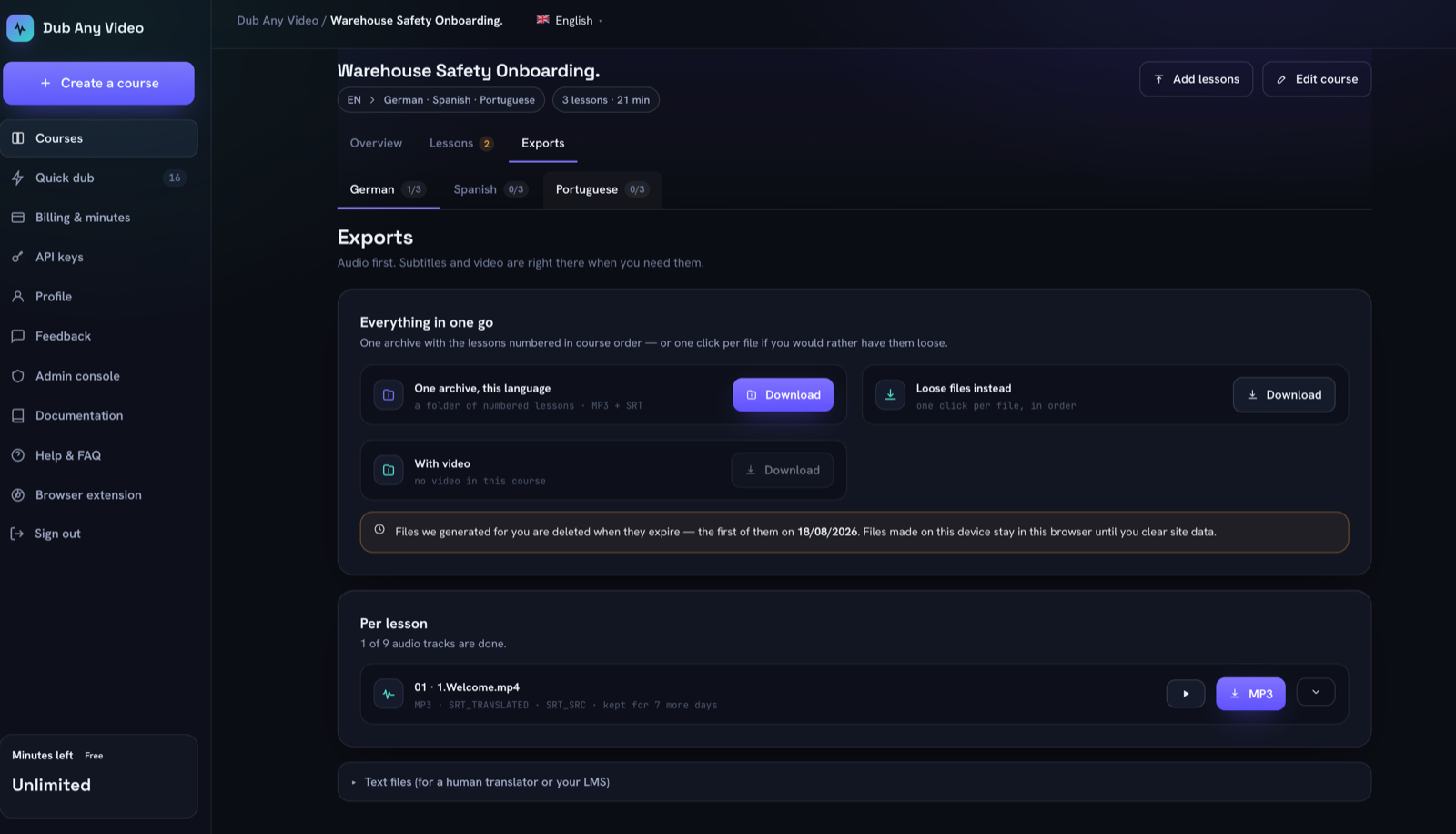 Audio first, subtitles beside it, and the expiry date stated on the screen.
For a course lesson the output is audio and text: an MP3 of the dub, the translated subtitles, the original-language subtitles, and the machine-readable transcript that carries the timings and speaker labels. Subtitles come in both SRT and VTT. Everything can be pulled per lesson or as one archive per language, with the lessons numbered in course order so an LMS import lands in the right sequence.
Video is deliberately optional. The course path produces audio only, for a practical reason: you already have the video, and a second copy of it per language costs storage and bandwidth for a file nobody asked for. On the API surface that does produce video, the video stream is copied rather than re-encoded wherever the codec allows, the original audio stays in the mix at low volume so ambient sound survives, and the dub sits on top. A full re-encode only runs when the source codec cannot be copied into an MP4.
Generated files expire, and the screen says when.
Where an error goes once it has been made
| Stage | The error | What it turns into | Where it can still be caught |
|---|---|---|---|
| Extract | no decodable audio | job fails at once | before any cost is spent |
| Voice detection | silence or music only | refusal, not a dub | the refusal itself |
| Transcription | misheard product name | translated, then pronounced confidently | reading the source column |
| Transcription | two speakers in one line | one voice reads both parts | the word-level split, then the speaker chip |
| Diarization | two people merged into one | they share a voice for the whole lesson | the speaker panel, by hand |
| Diarization | one person split into two | the voice changes mid-lesson | the speaker panel, by hand |
| Translation | a clause quietly dropped | spoken as if complete | reading the translation column |
| Translation | line much longer than the source | compressed up to the cap, then drift | the length warning before generating |
| Synthesis | shouted capitals | word spelled out letter by letter | automatic normalization, not review |
| Mixing | audio longer than its window | pushed later, never cut | listening to the result |
The last column is the interesting one. Almost nothing gets caught by a later machine, because no later machine has doubting the earlier one as its job.
Where the human belongs
Exactly one place: after everything is written down and before anything is spoken.
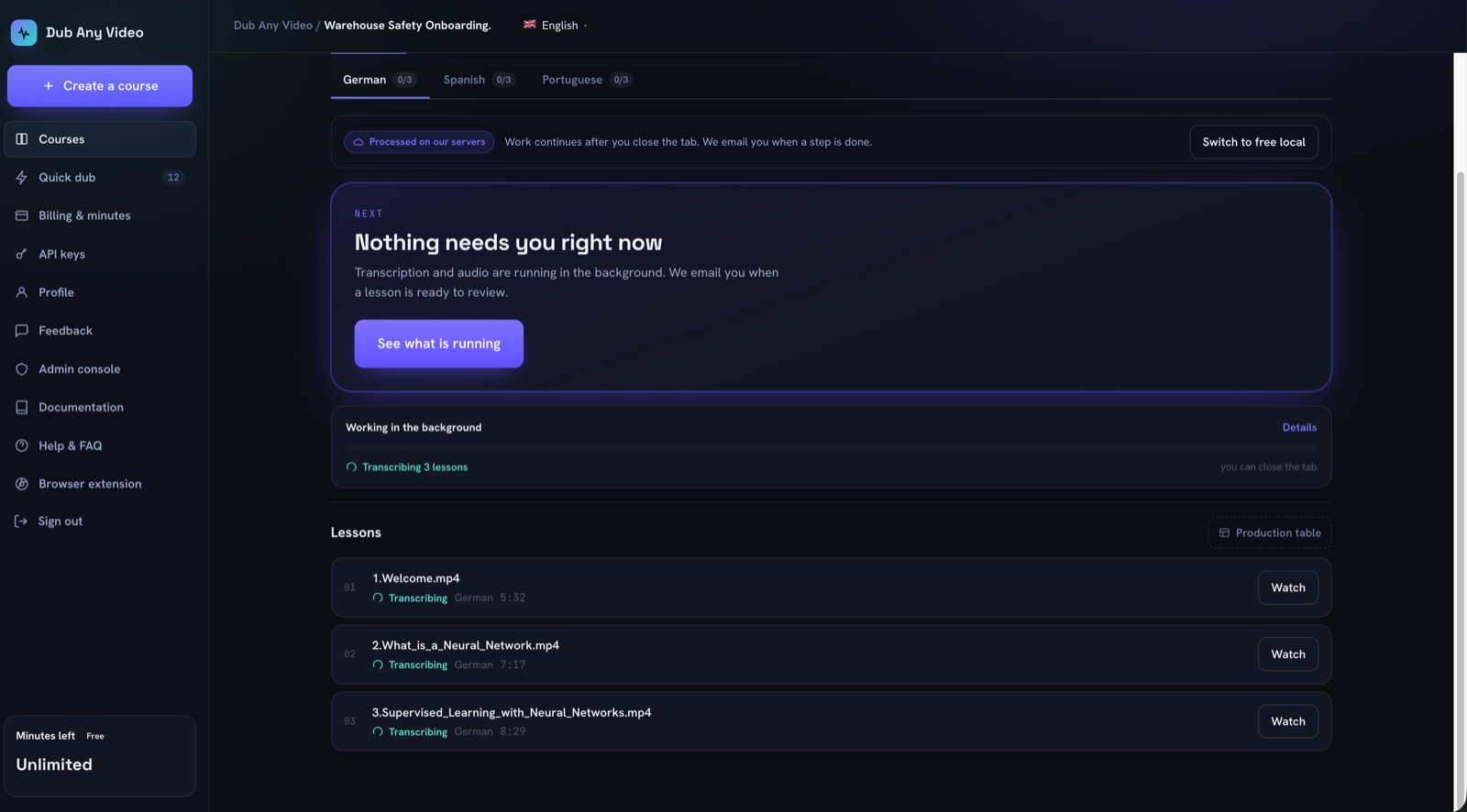 Everything before the review is preparation. Nothing has been voiced yet.
That position is not arbitrary. Before it, there is nothing to check. After it, every fix costs a regeneration, and regeneration is per lesson and per language, not per line. The lesson in the screenshots reserves six minutes of balance for German. Change one sentence after generating and you spend six more.
What Approve sends is the corrected text with its timings, the speaker each line belongs to, and the voice you picked for each speaker. When every line of that language has a translation, your translation is the script and nothing translates it again. When some lines are still empty, the source text goes instead and the whole lesson gets machine-translated, because a half-filled script would be spoken half in the original language.
The QA checklist covers what to actually look at, and terminology and voice consistency covers the part that only shows up across a whole course.
The same shape, running in a browser
The free in-browser mode runs the same stages in the same order on your own machine, with three real differences. There is no diarization at all, so every line belongs to one speaker and a two-person recording gets one voice locally. Transcription goes to a provider you hold the key for, rather than to us.
The third difference is in the timing stage, which has an extra move available there. Because the browser controls the video element, it can slow the video down slightly when speech will not fit, instead of only speeding the speech up. It speeds speech to a limit, then slows video to a limit, then lets the overflow spill into the next window. As on the server, audio is never truncated.
Questions people actually ask
Is this lip sync?
No, and nothing here claims to be. Timing works per line: speech is fitted into its window by pace and start point, never by cutting words. Mouths keep doing what they did.
Does it clone the original speaker's voice?
No. Each speaker is mapped to one of the fixed voices, and you choose which. The classifier's gender guess only decides which voice is offered first.
Can I skip transcription if I already have subtitles?
Yes. Supplying cues replaces that stage, and supplying speaker labels with them replaces diarization too.
What if the source is already in the target language?
Translation is skipped and the text is spoken as it stands.
How long can one video be?
Sixty minutes per job. Transcription without dubbing costs half the per-minute rate, since it stops after the first two stages.
Can I drive this from code?
Yes, through the API. The ten-line version is the shortest useful example.
To watch this happen on your own material instead of reading about it, start a course and stop at the review screen. It is the last point where a change is still free. For the workflow around it, start with how to translate a video with AI.