Developer blog
Free Local vs Cloud Video Translation: Privacy, Scale and Trade-offs
"Free" is the wrong axis to choose on. The useful question is where the work runs, because that decides everything else: what leaves your machine, what happens when you close the tab, and whether you can process forty lessons overnight.
Here it costs nothing to run a lesson in your browser, and the reason is not generosity. Your laptop is doing the work.
Start here
| Your situation | Where to run it |
|---|---|
| One lesson, and the material is sensitive | Browser |
| The video is under NDA and cannot go to a vendor | Browser, with an imported transcript |
| Forty lessons that need to be done by Monday | Servers |
| Two speakers who must sound like two people | Servers |
| Your target language is Catalan, Welsh or Persian | Browser, because our servers do not speak them |
| Your target language is Japanese, Korean or Croatian | Servers, because a browser voice does not exist for them |
| You want to close the laptop while it works | Servers |
| You are evaluating the tool and do not want to pay to find out | Browser |
What "local" actually means here
A local lesson runs in the tab. The video file never leaves it: the media blob, the parsed lines, the per-line audio and the finished track all live in your browser's own database, and the page reads them from there to play the result back.
Speech is synthesized on the device by Piper, compiled to WebAssembly, using WebGPU when your browser exposes it and the CPU when it does not. The voice models themselves are downloaded on first use from their public model repository rather than shipped with the page, so the first lesson in a new language fetches a file and later ones do not.
Two things do go out.
If you ask for a transcript, the audio is sent to a speech-to-text provider using your own API key, straight from the browser to OpenAI, Groq or Deepinfra. It does not pass through us and we never see the key. If you would rather nothing left at all, import an SRT or VTT you already have, and no audio moves anywhere.
Translation sends the text of your lines, and only the text, to Google's public translation endpoint without any key attached. Import an already translated subtitle file and that step does not happen either.
One more thing worth saying plainly: when a free course lives in your account, our server holds its shell. The course title, the target languages, the lesson order and the state of each lesson in each language. Not the video, not the transcript, not the translation, not the audio.
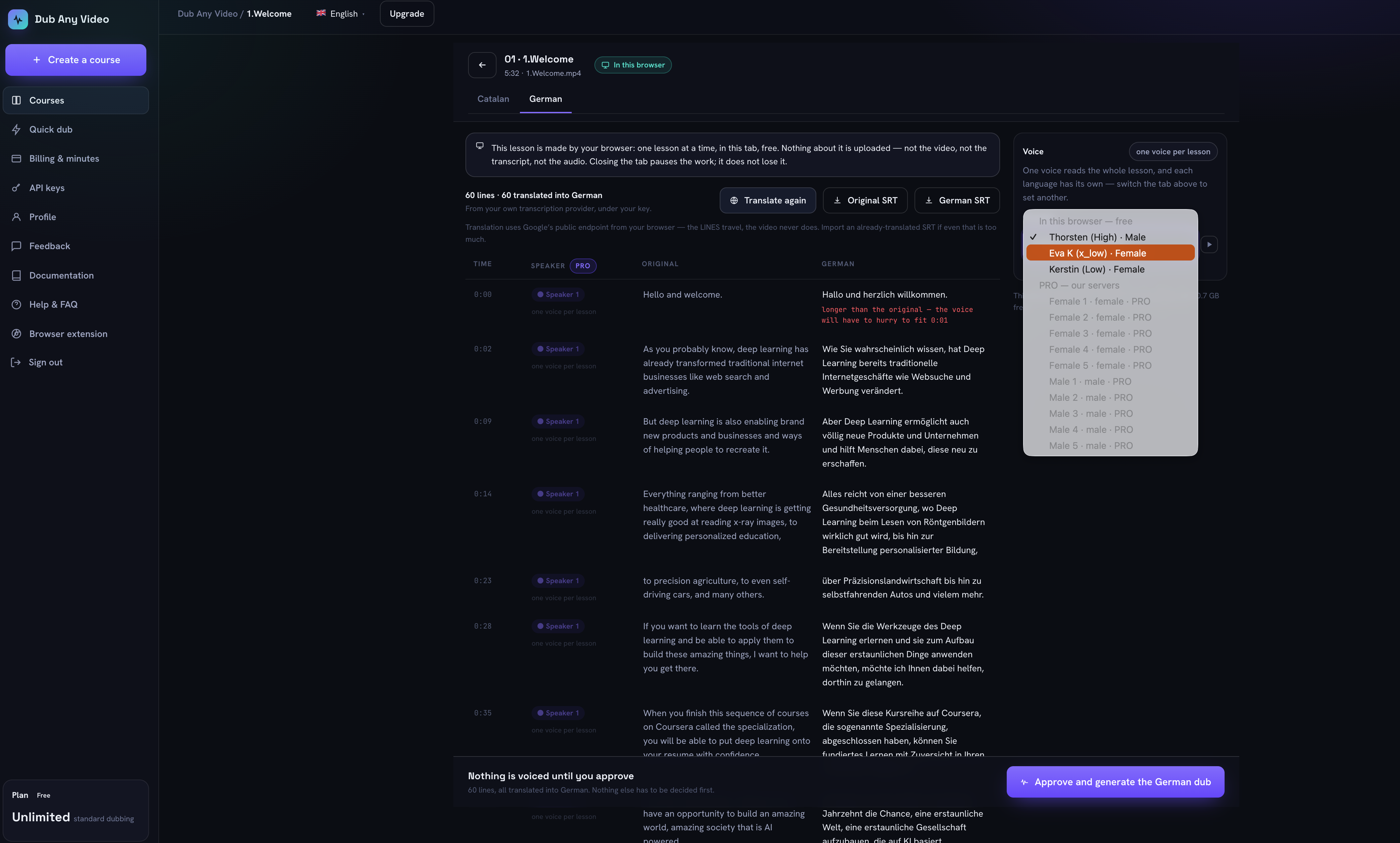 The whole trade-off on one screen: the voice list offers three on-device voices for German and lists the ten premium ones as unavailable, the speaker column is marked PRO, and the panel says one voice per lesson.
What the servers do that a tab cannot
Paid processing is a different set of capabilities rather than a faster version of the same one, and three of them decide most cases.
Speaker separation is the big one. The server pipeline works out who is speaking on which line and lets you give each person their own voice. A browser lesson is read start to finish by one voice, and the review screen says so on the panel rather than hiding it behind a control that is missing.
Then there is work that outlives the tab. A server job keeps running after you close it, which is what makes forty lessons a plan rather than an evening. The browser wants the tab open and does one lesson at a time.
And the results end up as files on a server, downloadable per lesson and per language or as one archive, with a stated deletion date instead of a promise.
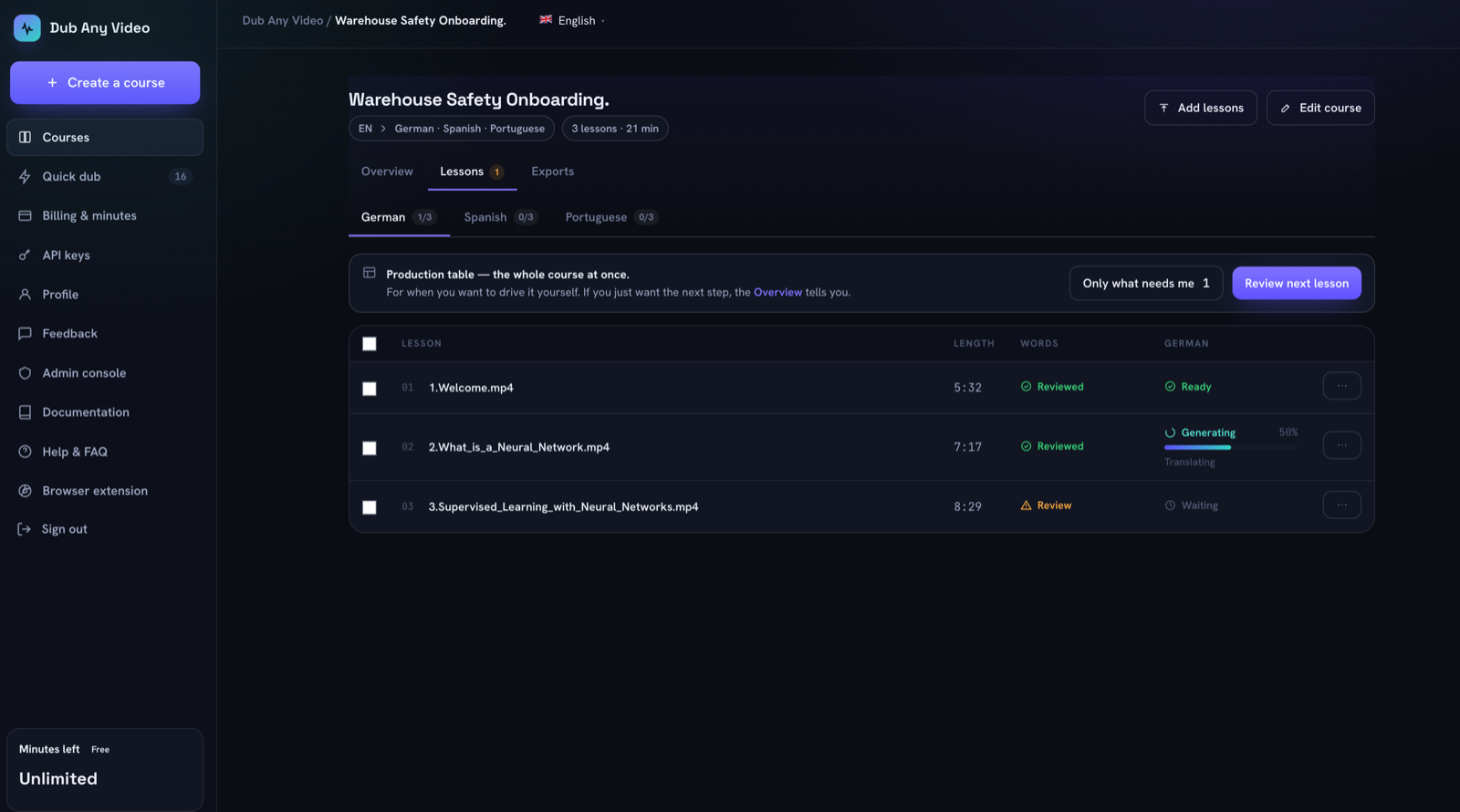 The view that only makes sense once work outlives the tab: every lesson and language pair carrying its own state.
The comparison, line by line
| In your browser | On our servers | |
|---|---|---|
| Cost | Free, no card | From EUR 7.99 a month for 12 hours of processing |
| The video file | Stays in the browser | Fetched by the pipeline from the link you give |
| Audio for transcription | Goes to your own provider with your key, or nowhere if you import text | Goes to our pipeline |
| Translated text | Goes to a public endpoint, or nowhere if you import it | Handled in the pipeline |
| Speakers | One voice per lesson, no separation | Detected, correctable, a voice each |
| Voices | Piper, on device, one per language | Ten premium voices, any language they cover |
| Languages | 39 | 31, of which 26 overlap |
| Concurrency | One lesson, tab open | The whole course, tab closed |
| If the tab dies | Finished lines are kept, the run resumes | Irrelevant, the work is not there |
| Where results live | Your browser until you clear it | On the server until the stated expiry |
| Length limit | Your machine's patience | One hour per job |
The language row surprises people, so it is worth stating without the table. Neither catalog contains the other. Our servers speak 31 languages and a browser speaks 39, with 26 in common. Croatian, Estonian, Japanese, Korean and Lithuanian exist only on the servers. Catalan, Georgian, Icelandic, Kazakh, Luxembourgish, Malayalam, Nepali, Norwegian, Persian, Serbian, Swahili, Telugu and Welsh exist only in the browser. The workspace picks the right list depending on where the course runs, so a free course can target Catalan and a paid one can target Japanese.
What this costs your machine
Local processing is real work on your hardware, and the pipeline is built around that constraint rather than pretending it away. Synthesis happens in a worker so the interface stays usable, and the worker is restarted every twenty-five lines to keep WebAssembly memory from growing until it crashes.
The practical shape of it: a long lesson will warm up your laptop and take roughly as long as it takes, the tab has to stay open, and closing it stops the run. Finished lines are already stored, so reopening continues from where it stopped instead of starting over.
Four situations, four answers
A compliance course nobody outside the company may see
Browser, with an imported transcript. Then the video never moves, no audio reaches a speech provider, and only the lines you chose to have translated are sent anywhere. That is a narrow claim, which is the only kind worth making.
A 40-lesson academy in six languages, refreshed quarterly
Servers. Not because the browser cannot do it, but because six times forty is 240 runs that each need an open tab, and because you want speaker separation and one place where the state of every pair is visible.
One conference talk with two speakers
Servers, for the separation alone. A browser will voice both people identically, and an audience hears that immediately.
You are still deciding whether this workflow suits you at all
Browser. Build the whole course locally, read a lesson, generate it, listen. It costs nothing and no card is asked for, and the paid path uses the same screens, so nothing is wasted if you move.
Check the privacy claims yourself
You should not take any of the above on trust, and it takes five minutes to verify.
Open your browser's developer tools before you start a local lesson and watch the Network tab. Sort by domain. You will see requests to our own domain for the page and its assets, requests to the model repository the first time a voice is used, a request to the translation endpoint carrying text when you translate, and requests to your chosen speech provider if you asked for a transcript. What you should not see is your media file being posted anywhere. If you import a transcript and pre-translated text, the only third-party traffic left is the voice model download.
Then open the Application tab and look at IndexedDB. The database is called browser-dubbing, and the video, the lines and the finished audio are sitting in it. That is where they stay until you delete them.
Do the same for the paid path so you know what the difference actually is, rather than what a comparison table told you.
Limitations, stated rather than buried
Free means one lesson at a time, only while the tab is open, no speaker separation, and files that live in your browser where we keep no copy of them. If you clear site data, they are gone and we cannot restore them.
Neither mode does lip sync or voice cloning, and neither translates live. Local synthesis is a desktop-class job; a phone is not the right machine for it. And a browser lesson is read by one voice, which is a limitation and not a setting waiting to be found.
On the paid side, a single job is capped at one hour of media, a course at 200 lessons and 10 target languages, and generated files carry an expiry date that the exports screen shows you.
FAQ
Is the free tier a trial?
No. It is unlimited because your machine does the work, and no card is required. Paid minutes buy server processing, not a bigger version of the same thing.
Is local processing private?
Narrowly and verifiably: your video never leaves the browser, and we store none of its content. Audio reaches a speech provider only if you ask for a transcript with your own key, and line text reaches a translation endpoint unless you import a translation. Anything broader than that would be a claim I cannot back.
Can I start locally and move to the servers later?
The screens are the same and the workflow is the same, but a browser course is not silently converted into paid work: the server refuses that on purpose, so nothing spends your balance without you deciding to.
Why is the browser voice not the premium one?
The premium voices run in our pipeline. The browser lesson lists them next to the free ones so you can see what exists for your language rather than reading about it somewhere else, and they are shown as unavailable rather than hidden.
What happens if I close the tab mid-run?
The lines already synthesized are stored, and the run picks up from there when you come back. Nothing continues while the tab is closed.
Does a free course still appear in my account?
Yes, as a shell: its title, languages, lessons and their states. The content of those lessons stays on your device.
Pick by workload, not by price
Two questions settle it. Does the material allow leaving your machine, and does the work need to outlive the tab? If the answer to the first is no, run it locally and import your text. If the answer to the second is yes, pay for the servers, because an open tab is not a production system.
The walkthrough shows the whole path on one lesson, the buyer's checklist covers what to test in any tool before committing a catalogue, and the review checklist is what to read before anything gets spoken in either mode. When you want to try it without paying, dub one in your browser.