Developer blog
How to Keep Terminology and Voices Consistent Across Training Videos
Here are two lines from the same German lesson, seven seconds apart, written by the same engine in the same pass.
At 0:02: "Wie Sie wissen, hat Deep Learn traditionelle Internetgeschäfte wie Websuche und Werbung bereits verändert."
At 0:09: "Aber Deep Learning ermöglicht auch neue Produkte, Geschäfte und Wege, Menschen zu helfen."
Nothing was wrong with the source. The speaker said "deep learning" both times. The machine simply had no reason to be consistent, because consistency is a decision and nobody had made one yet.
Now multiply that by fourteen lessons and six languages. Your product name survives in lesson 1, gets translated in lesson 3, comes back mangled in lesson 7, and by lesson 12 an attentive learner has quietly stopped trusting the course.
Why this compounds instead of averaging out
Machine translation is per request. The engine translating lesson 7 has no memory of lesson 3, so every lesson is a fresh coin flip on every name you care about. Those errors do not cancel out. They accumulate into a course where the same thing has four names.
Voices drift for the same reason. A tool that asks you to choose a voice per file gets a different answer from you on a Tuesday than on a Friday, and no file knows what the others sound like.
No folder structure and no better prompt fixes either one. What does is storing the decision above the individual lesson, so lesson 12 opens knowing what lesson 1 decided.
Build a small termbase, not a style guide
A termbase earns its keep by being short. Every word in it has to be decided in every target language, and a glossary nobody finishes is worse than none, because it looks finished.
| Put it in the termbase | Leave it out |
|---|---|
| Product and feature names | Ordinary vocabulary the engine already handles |
| Internal acronyms and system names | Whole sentences or slogans |
| Job titles and role names that appear in many lessons | Words that appear once, in one lesson |
| Module or certification names learners will search for | Anything you have not actually seen go wrong |
| Units and formats you insist on | Style preferences, which belong in review, not in a term |
Two mechanical limits decide what a term can do for you. It is matched as a whole word and case sensitively, so an acronym like IT does not eat every "it" in a German paragraph, and so a term does not follow a word into inflection: a language that declines nouns produces forms the glossary cannot recognize, and those stay your job during review. A term is also a word, not a phrase. The field takes 120 characters, but the longer the entry, the less often it matches anything.
A word becomes a term at the moment it is wrong
There is no glossary screen in this product, deliberately. Anyone filling one in up front would be guessing at which words matter. Terms get collected on the review screen instead, at the moment the translation in front of you is wrong.
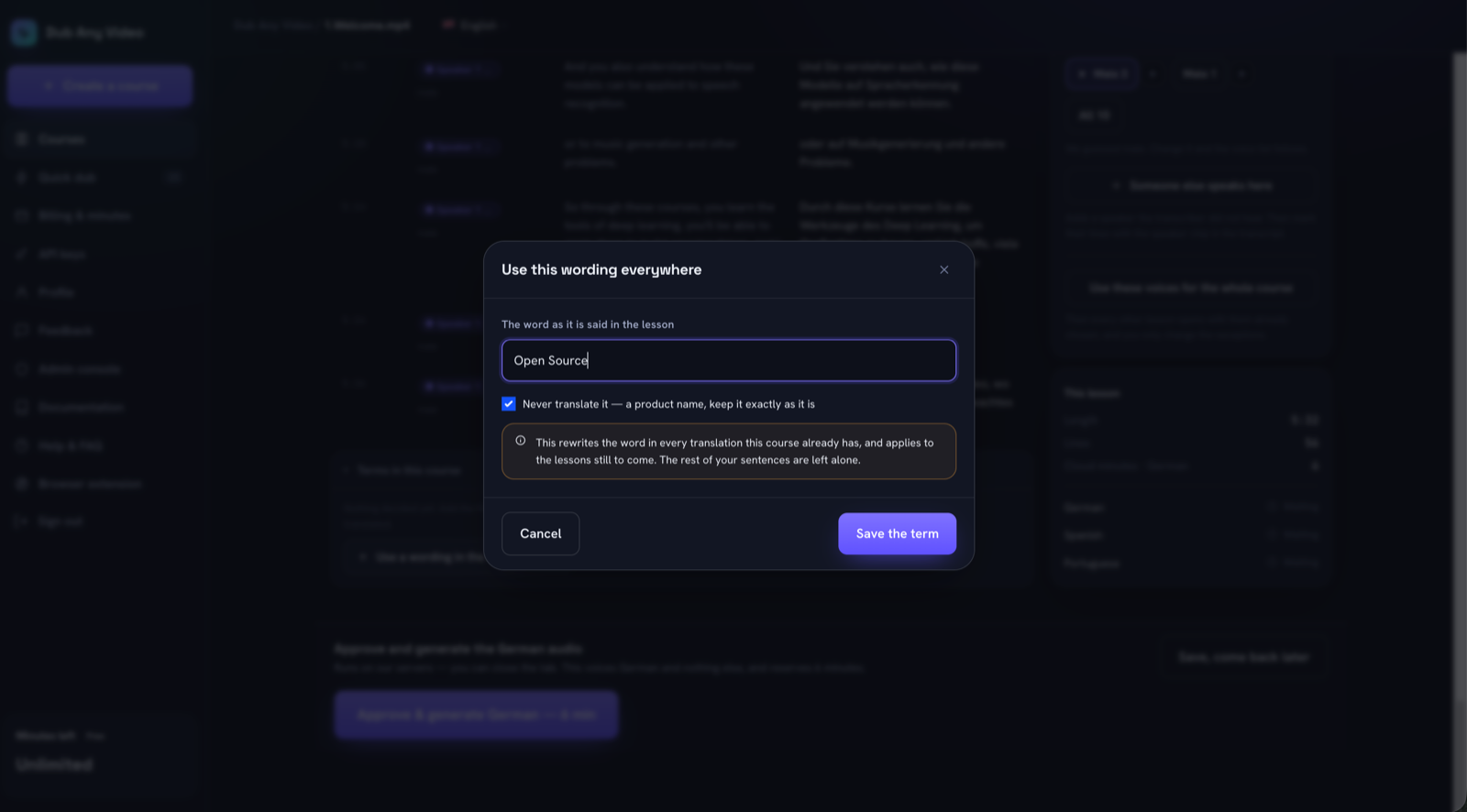 The two shapes a term has: a wording per language, or a name that must survive translation untouched.
Saving one does real work. It rewrites the stored translation of every lesson that has one, and the notice reports how many lines in how many lessons changed. That is the difference between a glossary describing your intentions and one that is true of the course.
The rewrite is narrow on purpose. It replaces the source word left standing in the translation and, when you edit a term later, the wording that term used to have. It never guesses at a third form. Look back at the German example: a term for "Deep Learning" marked as never translated will not repair "Deep Learn", which is neither the source word nor a previous rendering, and rewriting text nobody can prove belongs to the term would damage sentences you already approved. Mangled forms like that get caught by reading the lesson, which is the review pass.
The glossary never reaches the translation engine. It is applied on the way in: when a new lesson finishes translating, every term of the course is applied before you open it, and the wording you approve is the wording that gets spoken. The engine stays as smart as it was, and each lesson still arrives with the vocabulary the earlier ones settled on. Deleting a term rolls nothing back, because you have already read those lines and signed off on them. Which makes a typo in a term expensive: it is wording already written into your lessons, and you have to go find it.
Fill in every language, or at least see that you have not. The dialog offers every target language of the course, not just the one you are reading, and the list marks the gaps: a term with no wording in the current language shows "needs a word", and the header counts the undecided. Product names marked as never translated skip this, being their own rendering everywhere.
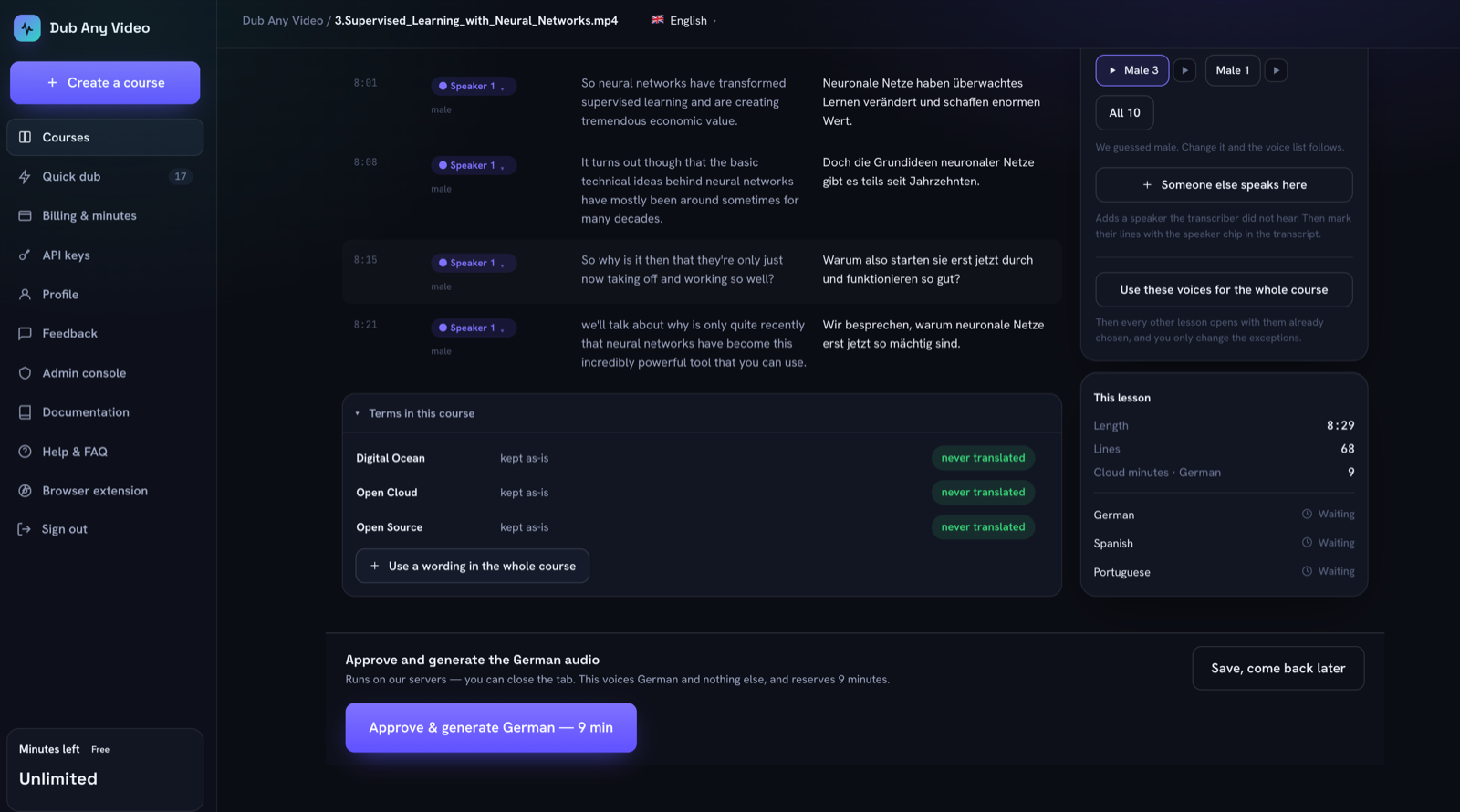 What the glossary looks like once a few lessons have been read. Three names the course keeps in English, and the button that adds the next one.
Choose the voices once, per course
Voices follow the same principle through a different mechanism. There is no per lesson voice setting, only a bulk decision: every speaker of a given gender gets this voice, applied either to the lesson you are on or to every lesson of the course.
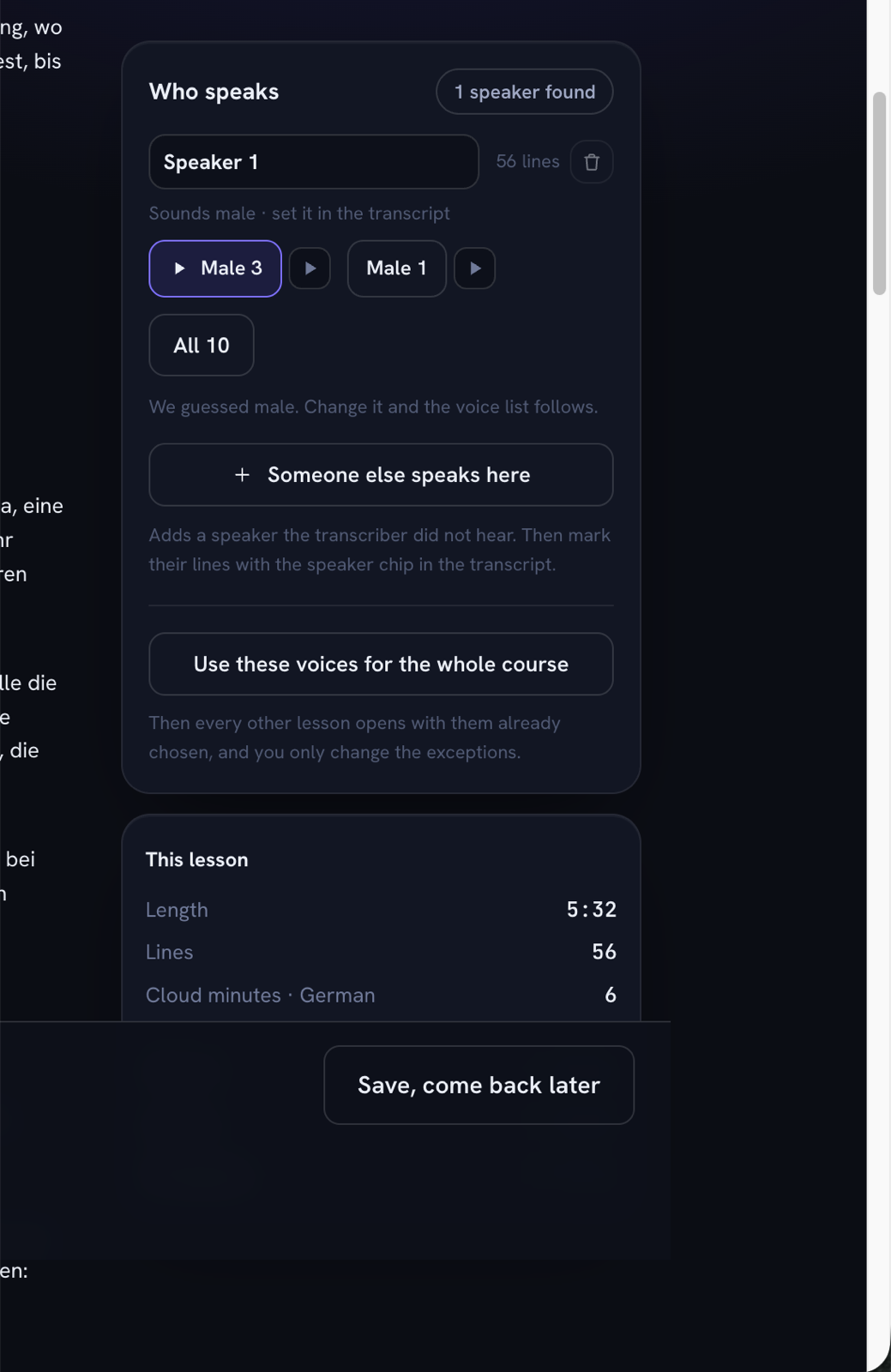 Pick the voice once here, push it across the course, and only exceptions need attention afterwards.
Hear it before committing a course. On that screen the speaker is set to Male 3, with Male 1 beside it as the alternative: Male 3 in German is the default every lesson would inherit, and Male 1 in German is what a deliberate exception sounds like next to it. Both are catalog previews of one fixed line, read by the engine that voices the lessons, not clips from a lesson.
The gender the voice list follows is a suggestion, not a finding. The transcriber guesses, the screen shows the guess as "sounds male", and you own the final word. When it cannot tell, "unknown" is a real answer, and a speaker left sitting there is what blocks the Approve button. The block states its reason: give every speaker a voice first. Better that than a lesson voiced on a coin flip.
Pushing voices across the course reaches the speakers who exist right now. A lesson still being transcribed has no speakers yet, so it picks up its own defaults when its transcript lands and you press the button again. Nobody gets a voice before the transcriber has heard them.
One voice or several
Each speaker is read by the voice you gave them, and the split you see on the review screen is the split the engine uses rather than one it works out again on its own. Two speakers you gave the same voice will be heard as one person, which is sometimes what you want. If you would rather not cast at all, one click gives the whole lesson a single voice.
In the free in-browser mode, one voice reads the lesson and there is no speaker detection at all. None of this is voice cloning, and none of it is a claim about who is speaking: speaker detection is a suggestion you confirm.
When an exception is correct
Consistency and uniformity are different things. A consistent course keeps its exceptions written down where you can find them again.
| Situation | Default or override |
|---|---|
| The same narrator across every lesson | Course default, set once |
| A guest expert who appears in two lessons | Override on those lessons, deliberately |
| One language where the default voice reads badly | Per language override, because a speaker can use a different voice in each language |
| A word your market genuinely translates differently | A per language rendering on the term, not a second term |
| A single lesson you think "just sounds better" different | Usually not an override. Learners hear the seam |
The per language override is the one people miss: a speaker carries a default voice plus an explicit choice per language, so setting German leaves Spanish alone.
Before you press Approve
Run it on the first lesson of each language, then spot check afterwards.
- Every speaker has a voice, and nobody is still sitting in "unknown".
- The speaker split matches what you hear, since the split decides which voice reads which line.
- The glossary shows no "needs a word" in the language on screen.
- Any term you just added reads correctly inside a sentence, not only in the dialog.
- The lines the machine mangled around a product name are fixed by hand.
- You are approving the language you actually read. The button voices that one language and names the minutes it reserves, so nothing gets spoken unread.
When a lesson changes afterwards
Editing anything that changes what will be spoken puts already generated languages into a state that says so. A ready language becomes stale: the file is still there and still downloadable, it just no longer matches the script. You decide whether that is worth regenerating, because nobody should spend your minutes for you, or keep serving a dub of a script you replaced.
Saving a term does this on every lesson it rewrote. That is the honest cost of a course-wide glossary, and why terms belong in the first review instead of after forty lessons. Two details soften it. Editing before anything has been generated marks nothing, and so does giving a voice to a speaker with no lines, since a speaker nobody hears cannot change the audio.
Regeneration is per lesson and per language, never per line. Change one sentence and that language of that lesson gets spoken again, while a change to lesson 3 leaves the rest of the course alone.
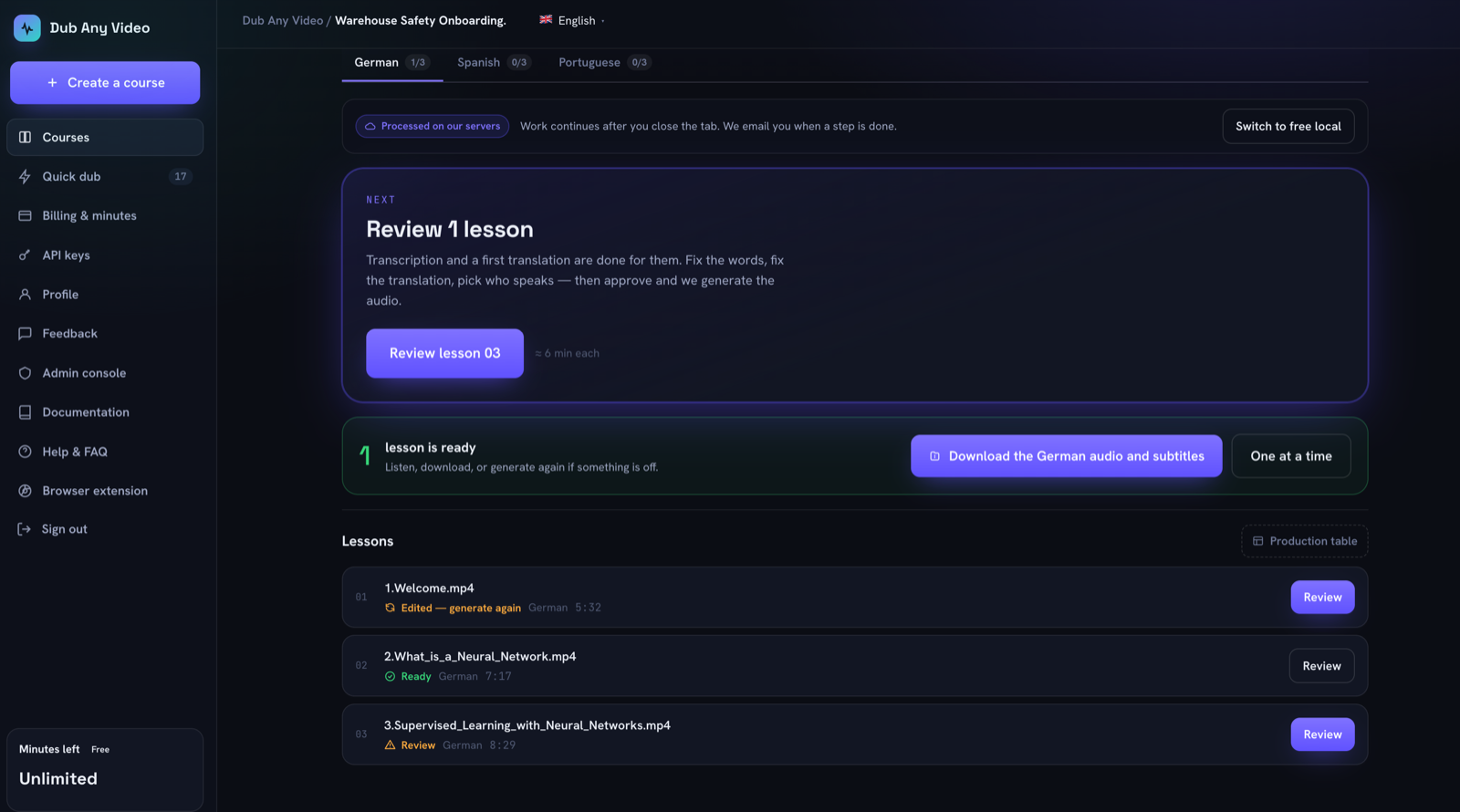 Three states on one screen. Lesson 1 was edited after it was voiced, lesson 2 still matches its script, lesson 3 has not been read yet.
What this looks like across three lessons
The three-lesson course in the screenshots: English into German, Spanish and Portuguese.
Lesson 1 carries the work. You read the transcript, fix what the transcriber misheard, then read the translation and find "Deep Learning" inconsistent and "Open Source" translated. Both become terms: one with a rendering in each language, one marked as never translated. You pick a voice for the speaker and push it across the course.
Lesson 2 opens with the voice already chosen and its translation arrives with both terms applied, so your reading is about meaning and rhythm instead of vocabulary you settled yesterday.
Lesson 3 is where the exception shows up: a second speaker, or a market where your term reads oddly. You fix that one language on that one term, and the rest stays as it was.
The engine did not improve between lesson 1 and lesson 3, and was still translating each lesson blind. What changed is that it stopped asking you questions you had answered twice.
FAQ
Is this translation memory?
No. No memory of past sentences, no fuzzy matching, no leverage discount: just a small list of words applied to the translations of one course.
Does the glossary guarantee correct terminology?
No. It guarantees that a word you decided on is written the same way everywhere it can be recognized. Inflected forms, mangled spellings and context still need a human reading the lesson, which is why the approval gate exists.
Can one speaker have different voices in different languages?
Yes. A speaker carries a default voice plus an explicit choice per language, and setting one language leaves the others alone.
Will adding a term cost me minutes?
Not by itself. It rewrites text for free and marks affected languages stale. Minutes are spent only when you approve a regeneration.
Does the free in-browser mode have terms and voice defaults?
No. The browser mode reads a lesson with one voice and has no course glossary. Course terms and course-wide voice defaults belong to the server side workflow.
Start with the first lesson
All of this comes down to one habit: when you fix a word by hand, ask whether you will have to fix it again, and if so, store the decision instead of the correction.
The buyer's checklist tests any tool against that, and the full walkthrough shows the whole path on one lesson. If you are still deciding whether this belongs in house, the comparison with a translation service covers it. When you are ready, create a course and let the first lesson tell you which words matter.